Linking Parameterized Test Case to Test Suite
Link both manual and parameterized test cases to the test suite, with parameterized test cases labeled as Parameterized.
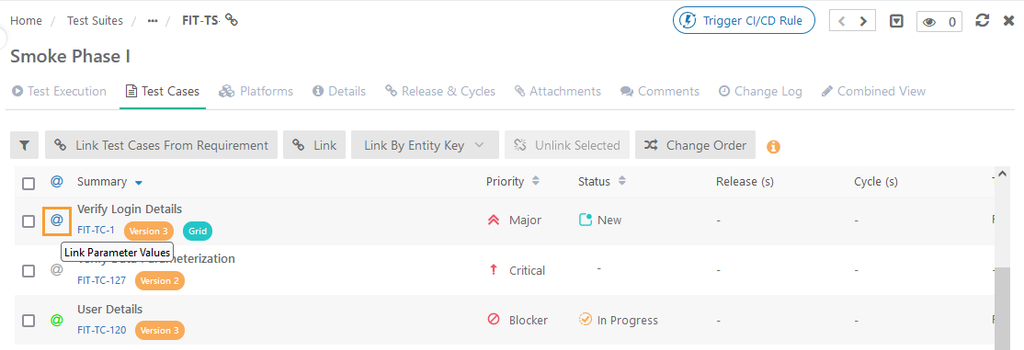
A color-coded indicator on the execution screen shows when parameter values are missing. This allows the test execution planner to spot test cases with unassigned parameters.
Color of @ sign | Indication |
@ in Grey | Non-parametrized test cases. |
@ in Blue | Parameterized test cases that do not have data values (for either all or any of the parameters). |
@ in Green | Parameterized test cases that have values assigned for all parameters. |
 |
Mapping Data Grid
To map a data grid, perform the following steps:
Go to the Test Suite detail page and select the Test Case tab.
Click @ to add values to the parameters.
Select the following Data Sources:
Select DataGrid: Use a Data Grid from the Data Parameterization module. The drop-down shows all available Data Grids, and data is populated accordingly.
Fill Data Manually: Enter parameter values manually and map them to the parameters.
Click Save.