Waterfall Implementation of QMetry Test Management
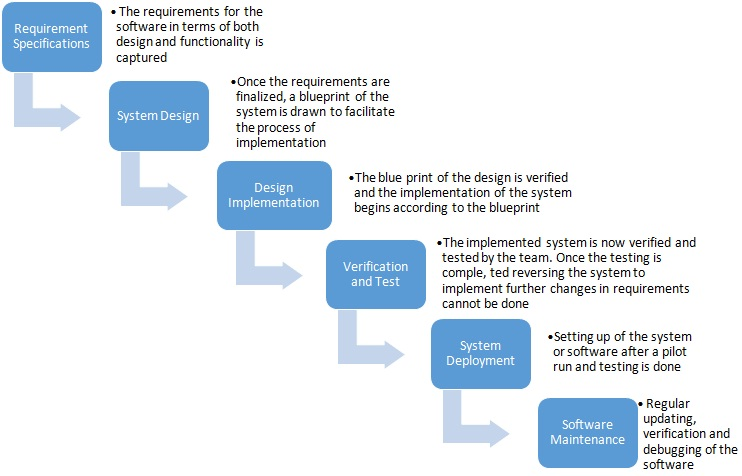
This guide is designed to help companies that use a sequential methodology often referred to as "Waterfall". Waterfall methodology starts with a requirement specification gathering process, then moves to system design and its implementation, then onto verification and testing phases, followed by its deployment on production instances which then finishes into a maintenance period.
Background
Health View is a Tech company that makes Activity Trackers. We will discuss the implementation of the Health View Activity Tracker.
Process and People
Health View Activity Tracker project uses waterfall methodology to manage their product releases. They leverage JIRA as their project management tool.
Health View Activity Tracker will have the following releases every 12 months.
Phase 1 ; Phase 2; Phase 3; Phase 4
Every Phase will have Alpha (RC1), Beta (RC2) and General Release.
QMetry and Waterfall Implementation
Step 1: Setup People
Integrate LDAP authentication or Single Sign On authentication with QMetry and enable all your users to log in QMetry. Alternatively, you can also use QMetry’s Authentication if you do not have LDAP or SSO.
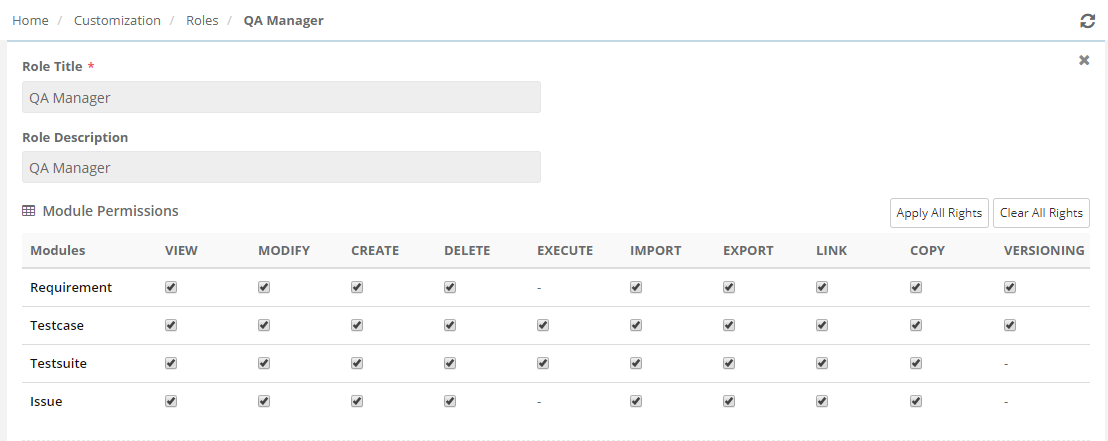
This is also good time to define roles. Typical roles recommended are:
QA Professional: Create and Maintain Test Cases, Test Suites and Defects.
Developer: Create and Maintain requirements and Defects, while view Test cases and Test Suites.
QA Manager: Can do what QA Professional and Developer can do, for given project.
Program Manager: Can do what QA Manager can do, for multiple projects.
Admin: Has rights to create projects and perform other administrative tasks that could potentially impact whole QMetry Instance. Refer help documentation for further details.
 |
Resources:
Refer to Help Document on Roles
Refer to Help Document on Users
Step 2: Setup Projects
The Project is the main container and is the equivalent to your overall Product or Project. Many companies that follow a Waterfall process choose to separate each project into a QMetry project. This may be appropriate for your organization; however, a key factor to consider is that all assets (Requirements and Test Cases) are stored at the project level and can be associated to multiple releases (Phases) and cycles.
In case of Health View Activity Tracker, the team is responsible for exactly one project: Health View Activity Tracker.
Note
If you are using JIRA and plan to integrate JIRA with QMetry, we strongly recommend using same project structure as JIRA. This way syncing of issues with JIRA will be extremely simple.
In each project, you can define Release and Cycles. Releases and Cycles can have start and end dates. Each release can have multiple Cycles or Phases.
You can create different Releases as per the planned iterations of the Products. The Releases can be as follows:
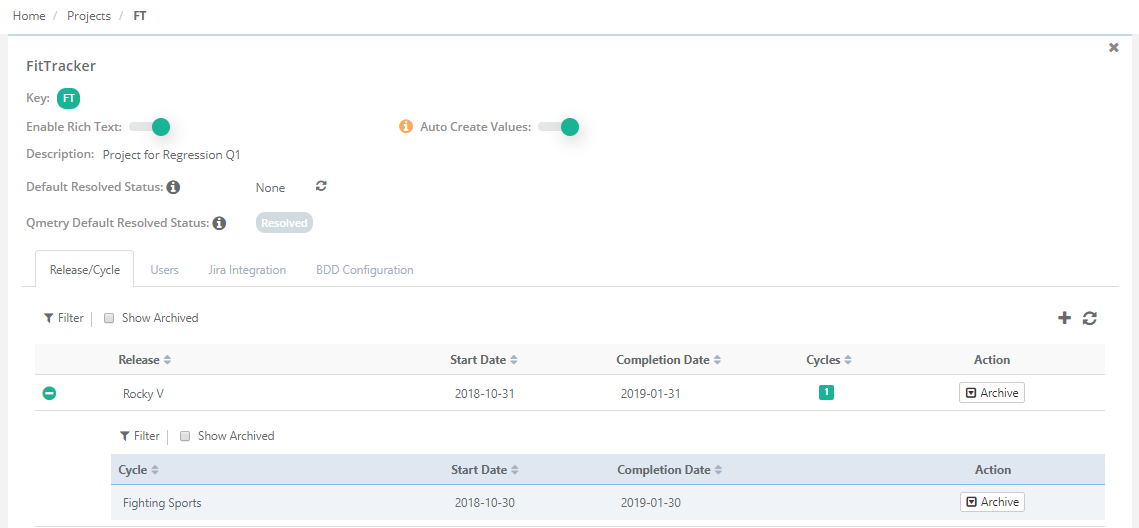
Release Names can be - Phase 1, Phase 2, Phase 3, Phase 4.
Each Release will have Cycles - Alpha (RC1), Beta (RC2) and General Release
To know more refer to:
Step 3: Create or Import Requirement
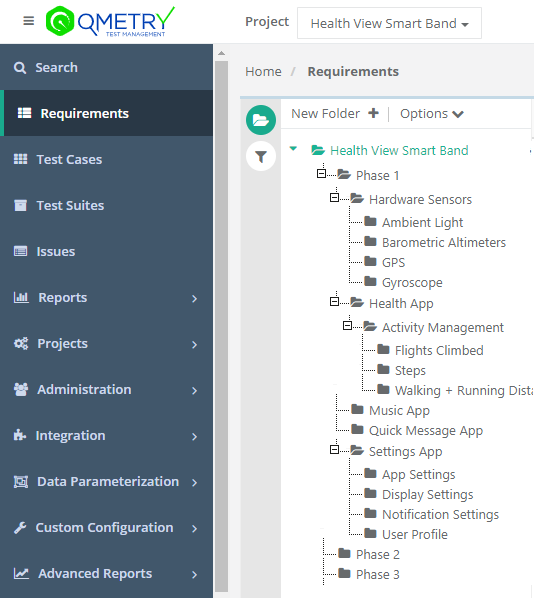
The Requirements for the Health View Activity Tracker can be grouped by creating folders for each phase. The phase folder can have sub-folders for the components of each phase like – Health App, Settings App, Messaging App or even Hardware components like Sensors.
Here is an example of how you can manage your Requirements structure in QMetryQMetry:
Step 4: Create Tests, group into folders, associate release/cycle and Link to Stories
In a waterfall development methodology, once the requirements are frozen, some general test cases are written for every feature or component in the Project. The test cases and features being developed continuously evolve across different phases of the project.
Go to Test Case module and start writing test cases. The test cases can also be grouped in components wise folders just like the requirements and a similar folder structure as Requirements are maintained. Write and document Test Steps, Test Data, and expected outcome. Attach screen shots or other material as supplement to test case.
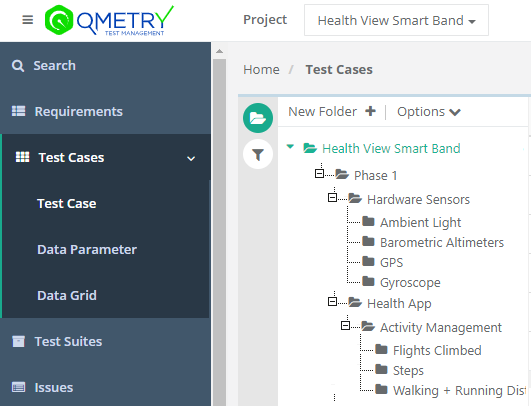
Manage all your Test cases under folder hierarchy. Create a folder for each component of your Project. Group subfolders with the name of sub-components/features.
Release Name is “Phase 1”, the folder structure could look as follows for different components like Health App, Settings App, Messaging App or even Hardware components like Sensors.
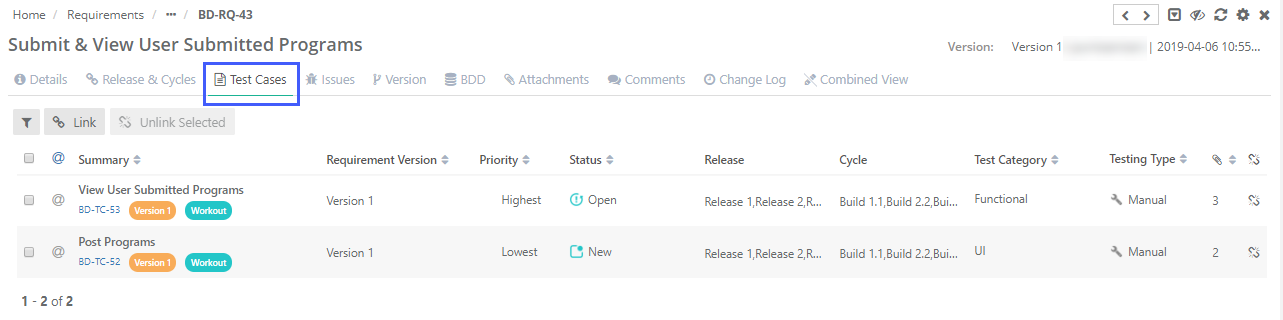
Link Test Case to Stories/Requirements. In our example, we have integrated QMetry with JIRA. QMetry automatically syncs requirements from JIRA to QMetry and keep them up to date.
Note
Linking test cases to Stories/Requirements is a good practice to determine test coverage and produce more meaningful reports
Depending on scope of your stories for a phase, you can associate corresponding Test Cases to planned release/cycle. Linking of Test Cases to Release/Cycle can be done from multiple places including Test Cases or Test Suites.
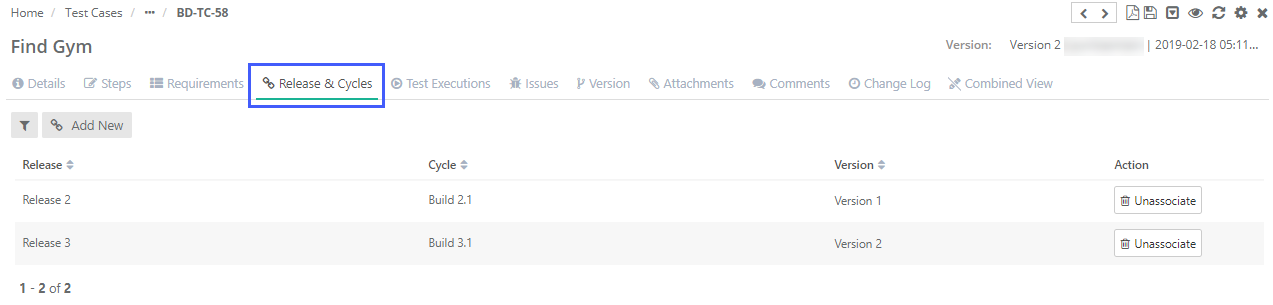
To know more, refer to:
Step 5: Estimate Your Test Cases
To estimate, how much can you really test in each test case for functional, SIT, Regression and UAT phases, it’s important to estimate each test case. Estimation is optional, if done, could be helpful in reporting.
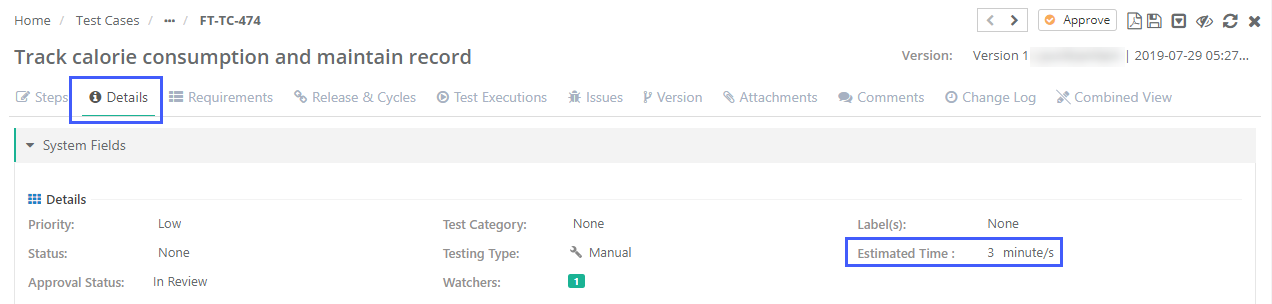
QMetry currently supports estimation in minutes. However, you can use point based or any other estimation technique as far as its numeric to match with your estimation technique in JIRA.
Step 6: Create Test Suites and manage them by iterations
The Test Suites are created for all test cases that are a part of the current cycle. The Test Suites can be grouped for different kinds of testing iterations performed like Functional Testing, SITs (System Integration Tests), Regression Testing and UAT Testing and Post Production Scenarios.
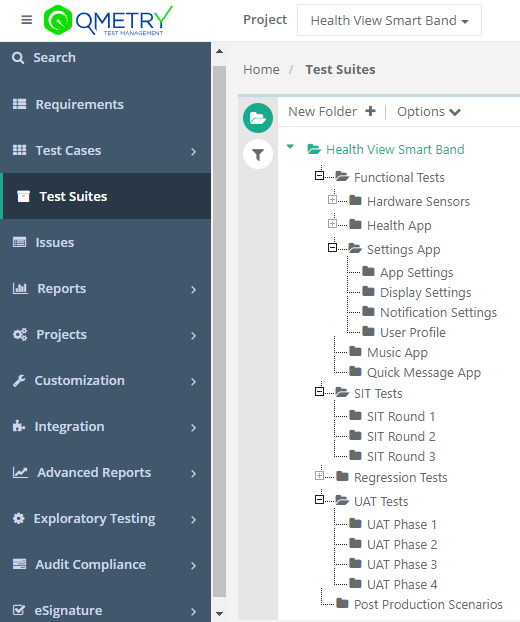
For a Waterfall Methodology of testing, generally the Development and Functional Testing undergo simultaneously with a continuous feed back from Testing Teams to Development teams over the development of each feature.
Once the development and functional tests are completed phase by phase, the System Integration Testing, Regression Testing and UAT Testing follows.
Step 7: Link bugs during executions and track them
Create Test Suites for all test Cases that are part of current cycle. Depending on platforms, invite Testers to execute tests and fill results. This is also a good time to log new defects as discovered during test execution.
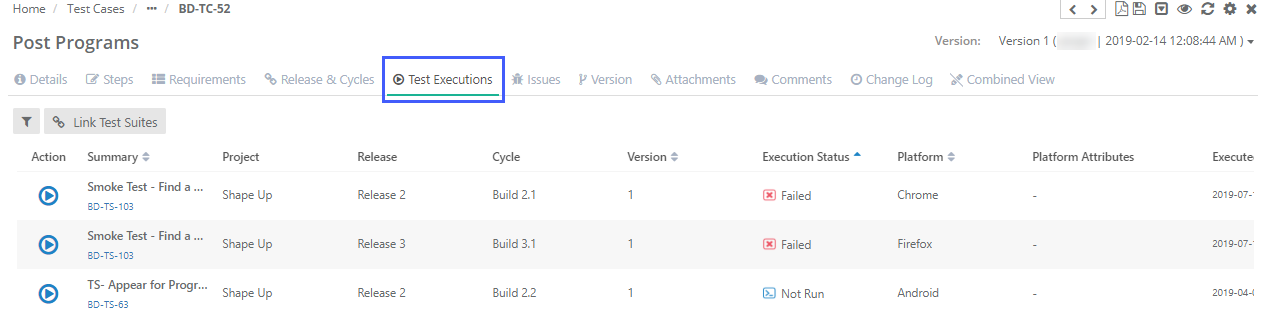
If your team does automation, this also good time to setup Jenkins/Bamboo integration to bring automation results inside QMetry. This way we can get comprehensive view of manual and automated testing.
Discuss progress in daily meeting, and re-assign test executions as required.
Step 8: View Executive Coverage Report
Executive Coverage report gives you 360-degree view of manual and automation testing. For the given scope of release, Coverage report, determines how much test coverage is present. Within what is covered, how many tests have been executed; with in what is executed, how much has passed Vs failed.
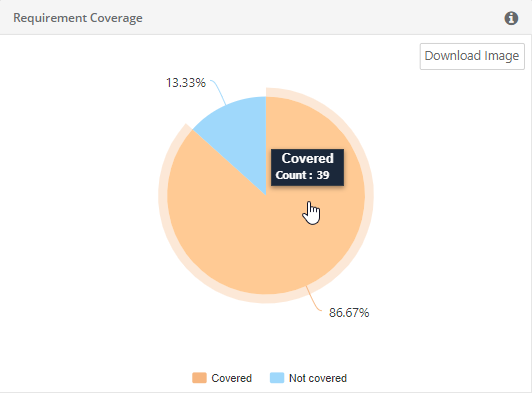
Coverage report also shows defects identified during testing, their priority and current status. This makes it really simple for executives to make informed go-no-go decision after reviewing manual and automated test coverage, test results along with defect status and severity.