Audit Log Report
The Audit Log Report records the events that take place in QMetry during a specified period. Events include Create, Update, Delete, Move, Copy, Archive, Unarchive, Clone, Add, and Remove. If you do not select a project, the report displays events across all projects.
The report also captures Test Run user-defined field (UDF) changes under the Execution module, and it captures create, update, and delete events for custom automation import templates under the Automation Custom Import Template module.
Report Details
The report includes the following details for each event.
Actor: The user who performs the event.
Event: Records the action like Create, Update, or Delete..
Activity: A description of what was created, updated, deleted, or otherwise changed. For test case execution UDF changes, the activity displays the UDF name followed by the operation type.
Project: The Project in which the test assets are located.
Module: Impacted module due to creation, updation, or deletion of test assets.
Entity key: The keys of the Test Suite and the Test Case affected by the event.
Date: The date on which the event took place.
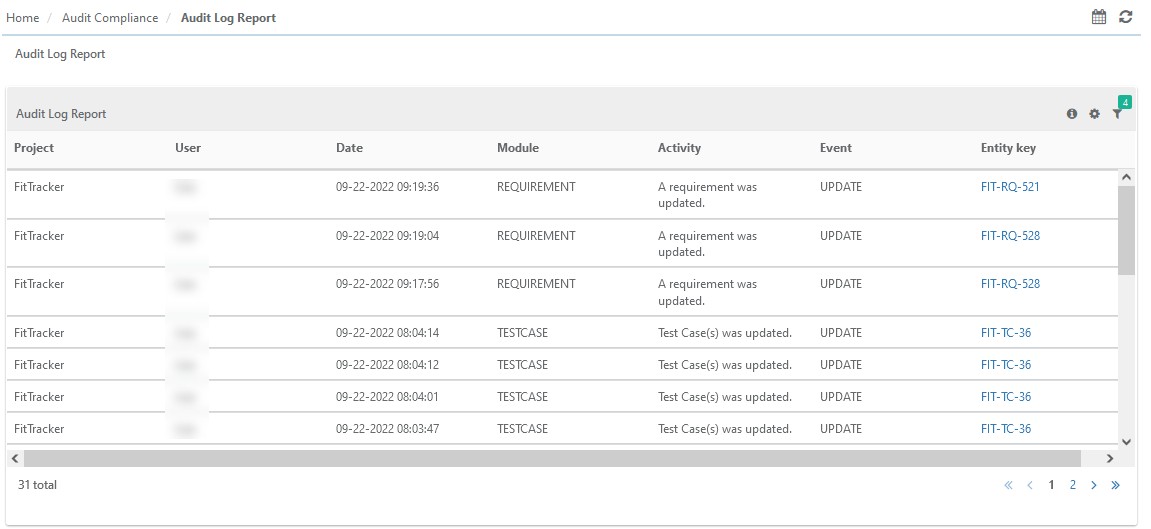
By default, the system generates the report for the current project and logged-in user.
Filtering the Report
Filter the Audit Log records by applying one or more of the following filters.
Project: Select projects.
User: Select users.
Date Range: Set a range of Date.
Module: Select modules.
Event: Select events.
Entity Key: Enter entity key
Custom Automation Template Events
QMetry records an audit event when you create, update, or delete a custom automation import template. These events appear under the Automation Custom Import Template module. The following table describes the activity and entity key that QMetry records for each event.
Event | Activity | Entity Key |
|---|---|---|
Create | Records that a custom import template was created. | Name of the template. |
Update | Records the fields that were updated, such as the import template name, description, field mapping, or JSON structure. | Name of the template. |
Delete | Records that a custom import template was deleted. | Name of the template. |
Schedule Emails to Send Reports
You can share updated reports with stakeholders on a regular basis. QMetry schedules emails that contain a PDF of the report details. To schedule outbound emails, perform the following steps:
Select the Schedule button for the report to share.
Set the recipients and the frequency.
Select Save.
The Schedule icon turns green when the email is scheduled. View the history of scheduled reports on the Schedules tab on the same screen.