Create a Test Case from the Recorded Session
You can create test cases in QMetry from the sessions recorded during exploratory testing. This saves time, because you get automated test cases without writing them manually. You can link these test cases to requirements and test suites from the Exploratory Testing screen.
Pre-requisites
You need Create rights for the Test Case module and View rights for Exploratory Testing. Images captured during the session are available as attachments with the corresponding test steps.
To create a test case from the record session, perform the following steps:
Go to Exploratory Testing under Automation.
Open the session you want to create a test case, then select Create Test Case in the top right corner.
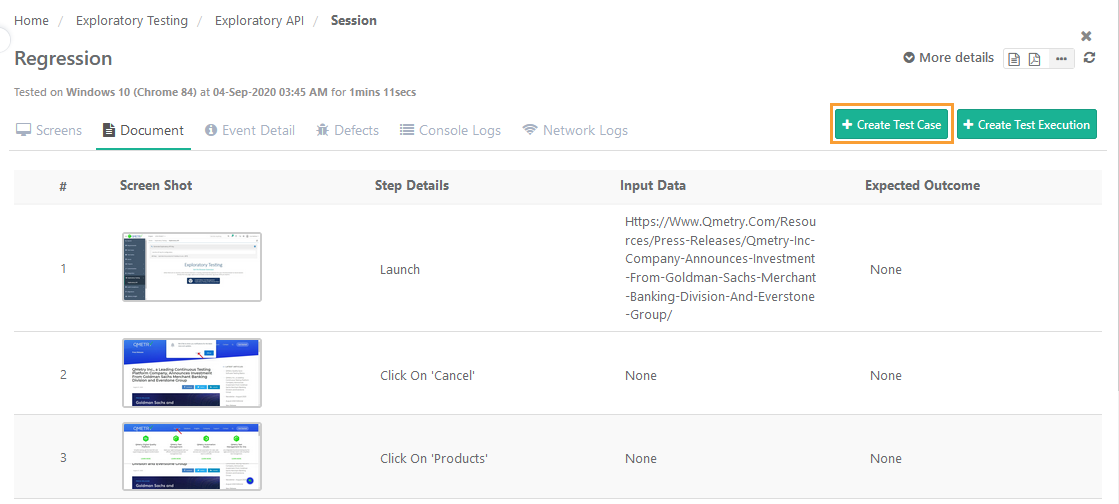
The Create Test Case screen opens with the QMetry fields. The session name is populated as the summary, and the events are populated as the test steps.
Note
Session Name is populated as Summary and Events are populated as Test Steps. Images captured during the session are available as attachments with corresponding test steps.
Linking Requirement to Test Case
You can link requirements to the test case while creating a test case from the session.
To link requirements to test case, perform the following steps:

Select Link.
Select the requirements on the screen that opens next. You can also link requirements from across projects.
The created test case appears in the Test Case module. The requirements linked to the test case appear on the Requirements tab.
