Create a Test Execution from the Recorded Session
You can execute the test case by associating it with a test execution from within the session as evidence of the tested use case.
Note
If the project has the eSignature feature (Approval Workflow and Part 11 Compliance) enabled, then the Create Test Execution button is disabled.
Open the Wizard
To open the wizard, perform the following steps:
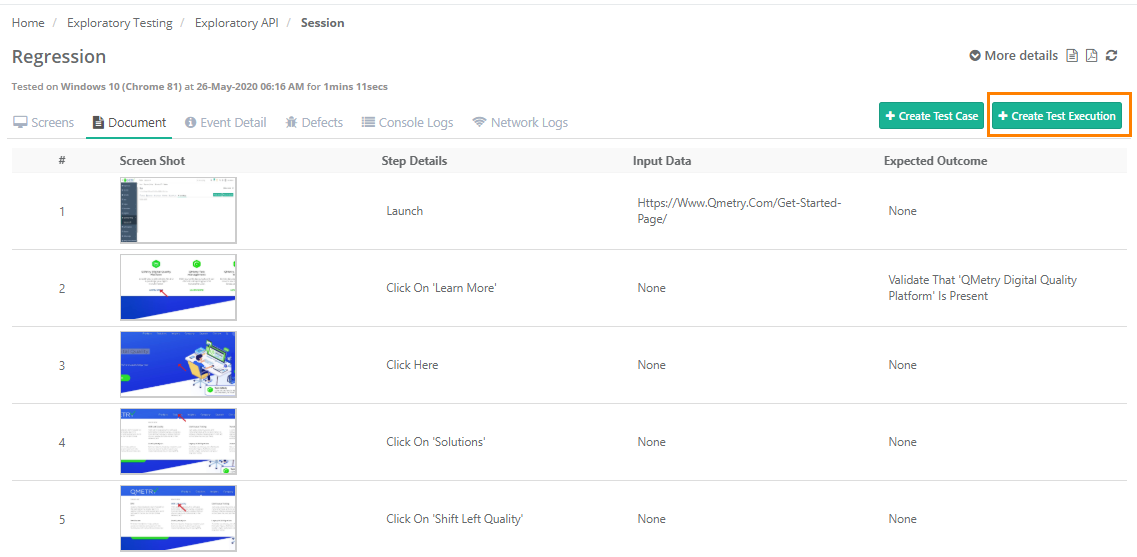 |
Go to Exploratory Testing under Automation.
Open the session for which you want to create a test execution.
Select Create Test Execution in the top-right corner.
Step 1: Create the Test Case
On the Create Test Case screen, the QMetry fields appear. The session name is populated as the summary, and the events are populated as the test steps. Enter the test case details.
To link a requirement to the test case, perform the following steps:
Select Link.
Select the requirements. You can also link requirements from across projects.
Select Next.
Step 2: Create or Link a Test Suite
Select the Next drop-down to display two options: Create Test Suite and Link Test Suites.
Create Test Suite
Complete the test suite fields.
Link at least one release and cycle to the test suite for execution.
Link the platform to the test suite.
Browse to and select the folder path where you want to store the test suite.
Select Next.
Select Yes to proceed.
Link Test Suites
To link existing test suites to the test case, select this option, select the test suite, and then select Next. A confirmation message appears. Select Yes to proceed.
After you create a test suite or link in existing one, execute the test suite.
Step 3: Execute the test suite
Execute the test suite on the linked platforms. The system automatically links all the bugs that are linked to the exploratory session to all the executions that are created.
On the Create Test Execution screen, review the combination of test suites against releases and cycles, along with the associated platforms.
Select a build for which you want to run the test suite, and select the Execution Status.
When you finish executing the test suites, select Finish.
The created test suite appears in the Test Suites module.
The test suite entity key has a link. Select the link to open the Test Execution tab, where you can see the test suites executed in the Exploratory Testing module.