Archiving Test Cases
Archiving removes test cases from all associated folders and moves them to a dedicated “Archived” bucket.
To archive a test case from the detail page, perform the following steps:
 |
Go the test case details.
Click the Archive icon located at the top right corner of the page.
The system archives the test case after confirmation.
Alternately, archive a test case from the test case module list view, by clicking the Cog (⚙️) icon and selecting Archive.
Note
Archiving restricts operations on test case. Like adding attachments, linking test cases, issues, or release cycles on an archived test asset.
To archive a specific Test Case Version, read Requirement and Test Case Versioning.
Unarchiving a Test Case
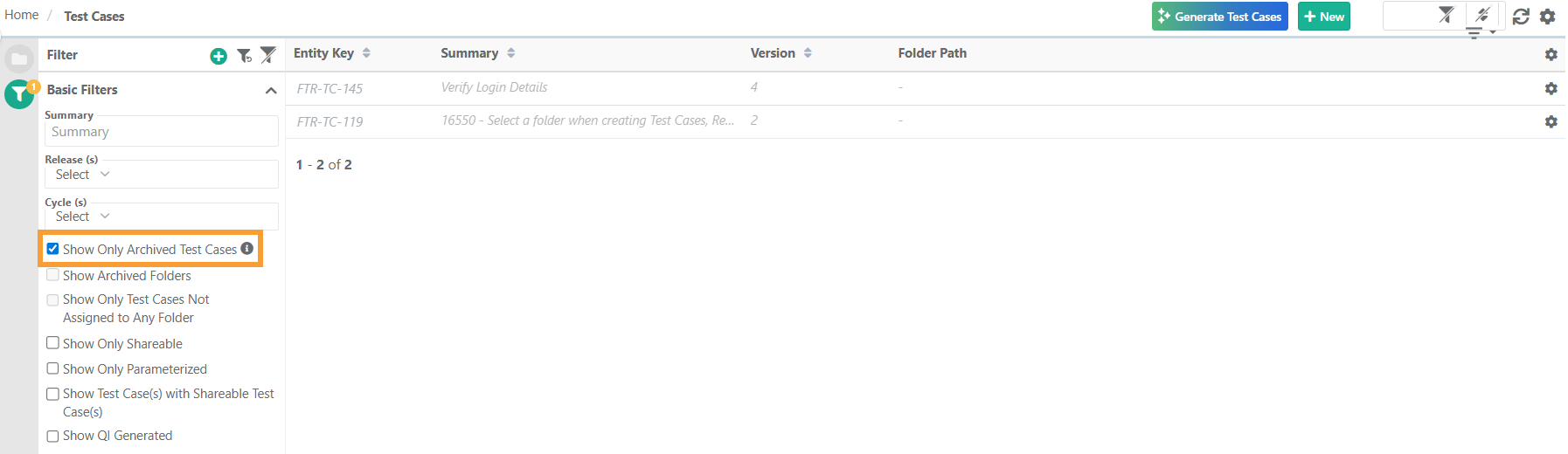
To unarchive an archived test case, perform these steps:
Go to the Test Case Module.
Expand the filters and select Show Only Archived Test Cases.
Click the Cog (⚙️) icon next to the archived test case.
Click and confirm.