Archiving Requirements
Note
Admins can set Archive rights for the requirement module from Roles.
You can archive requirements that no longer need any further action. Once you archive a requirement, the system restricts all operations and allows only view-only access.
You can archive a requirement in two ways:
From the Requirement Details Page.
From the Requirements List View Page.
To archive a requirement from List View, perform the following steps:
Note
Once a requirement is archived, all operations on the that requirement is restricted.
Archiving a Requirement from the List View
To archive a requirement from the list view, perform the following steps:
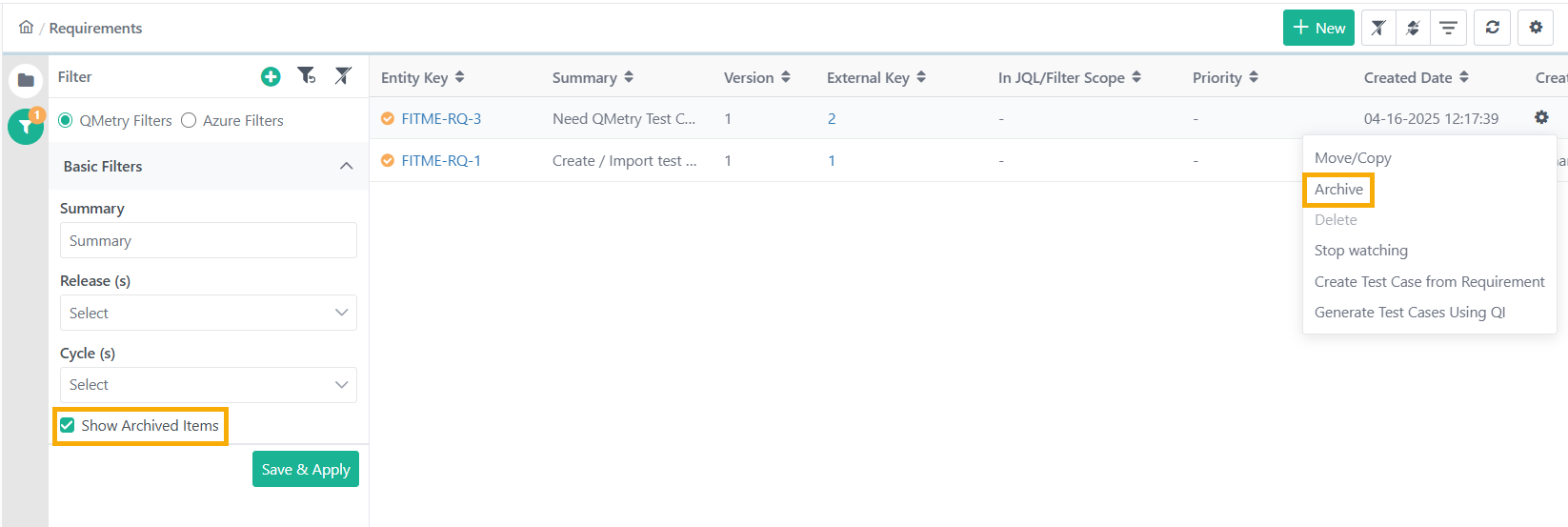 |
Go to Requirement List View.
Click the Cog (⚙️) icon for the requirement.
Select Archive and click Yes.
Related Topic
Unarchiving a requirement
To restore an archived requirement, perform the following steps:
Go to Requirements List View.
Expand the filters and select Show Archived Items.
Click the Cog (⚙️) icon for the archived requirement and select Unarchive.