Test Execution Cumulative Report by Day, Week or Month
Generate a report that shows the cumulative number of test executions over time along with their execution results. In QMetry, this report uses a stacked column or bar chart to display daily, weekly, or monthly execution data cumulatively.
Here, the system adds the count of the previous day to the current date count and so on.
SQL Query
SELECT
    (CASE
        WHEN @viewby in ('Day') THEN b.selectionCriteria
        WHEN @viewby in ('Week') THEN CONCAT(STR_TO_DATE(CONCAT(b.selectionCriteria,' Monday'),'%x%v %W'),'-',STR_TO_DATE(CONCAT(b.selectionCriteria,' Sunday'),'%X%V %W'))
        WHEN @viewby in ('Month') THEN CONCAT(MONTHNAME(STR_TO_DATE(RIGHT(b.selectionCriteria, 2), '%m')),'-',LEFT(b.selectionCriteria,4))
        WHEN @viewby in ('Year') THEN b.selectionCriteria
    END) AS `Date Range`,
    b.tcExecutionStatusName AS `countofTC`,
    b.countofval AS `Count of TC by Execution Status`
FROM
    (SELECT
        a.tcExecutionStatusName,
            a.selectionCriteria,
            a.cn,
            IF(@runstat = a.tcExecutionStatusName, ROUND(@csum:=@csum + COALESCE(a.cn)), ROUND(@csum:=COALESCE(a.cn))) countofval,
            @runstat:=a.tcExecutionStatusName
    FROM
        (SELECT
        dateData.selected_date,
            dateData.tcExecutionStatusName,
            COUNT(COALESCE(tcExecutionID)) AS cn,
            selectionCriteria
    FROM
        (SELECT
        dtbl.selected_date,
            temp.tcExecutionStatusName,
            dtbl.selectionCriteria
    FROM
        (SELECT
        selected_date,
            (CASE
                WHEN @viewby in ('Day') THEN selected_date
                WHEN @viewby in ('Week') THEN YEARWEEK(selected_date, 3)
                WHEN @viewby in ('Month') THEN EXTRACT(YEAR_MONTH FROM selected_date)
                WHEN @viewby in ('Year') THEN EXTRACT(YEAR FROM selected_date)
            END) AS selectionCriteria
    FROM
        (SELECT
        ADDDATE(`@Filter.Date Start`, t4 * 10000 + t3 * 1000 + t2 * 100 + t1 * 10 + t0) selected_date
    FROM
        (SELECT 0 t0 UNION SELECT 1 UNION SELECT 2 UNION SELECT 3 UNION SELECT 4 UNION SELECT 5 UNION SELECT 6 UNION SELECT 7 UNION SELECT 8 UNION SELECT 9) t0, (SELECT 0 t1 UNION SELECT 1 UNION SELECT 2 UNION SELECT 3 UNION SELECT 4 UNION SELECT 5 UNION SELECT 6 UNION SELECT 7 UNION SELECT 8 UNION SELECT 9) t1, (SELECT 0 t2 UNION SELECT 1 UNION SELECT 2 UNION SELECT 3 UNION SELECT 4 UNION SELECT 5 UNION SELECT 6 UNION SELECT 7 UNION SELECT 8 UNION SELECT 9) t2, (SELECT 0 t3 UNION SELECT 1 UNION SELECT 2 UNION SELECT 3 UNION SELECT 4 UNION SELECT 5 UNION SELECT 6 UNION SELECT 7 UNION SELECT 8 UNION SELECT 9) t3, (SELECT 0 t4 UNION SELECT 1 UNION SELECT 2 UNION SELECT 3 UNION SELECT 4 UNION SELECT 5 UNION SELECT 6 UNION SELECT 7 UNION SELECT 8 UNION SELECT 9) t4) v,(SELECT @viewby:= `@Filter.View By`) as v1
    WHERE
        DATE(selected_date) BETWEEN `@Filter.Date Start` AND `@Filter.Date End`) AS dtbl
    CROSS JOIN (SELECT DISTINCT
        tcExecutionStatusName
    FROM
        testexecutions tcr WHERE tcr.projectID in (`@Filter.project`)) AS temp) AS dateData
    LEFT JOIN (SELECT
        tcr.tcExecutionStatusName,
            DATE(tcr.tcExecutionStartTime) AS dat,
            tcr.tcExecutionID,
            tcr.projectID
    FROM
        testexecutions tcr
    WHERE
        tcExecutionStartTime IS NOT NULL AND tcr.projectID in (`@Filter.project`) AND tcr.releaseID in (`@Filter.Release`) AND tcr.cycleID in (`@Filter.Cycle`) AND tcr.platformID in (`@Filter.Platform`)) raw ON raw.dat = dateData.selected_date
        AND raw.tcExecutionStatusName = dateData.tcExecutionStatusName
    GROUP BY tcExecutionStatusName , selectionCriteria ORDER BY tcExecutionStatusName ASC) a
    JOIN (SELECT @csum:=0) r
    JOIN (SELECT @runstat:=0) p) b
    WHERE (select @viewby := `@Filter.View By`) <> ''
ORDER BY b.selectionCriteria , b.tcExecutionStatusName;
Apply the Filter
Filter the report based on multiple fields defined in filters.
Query Output
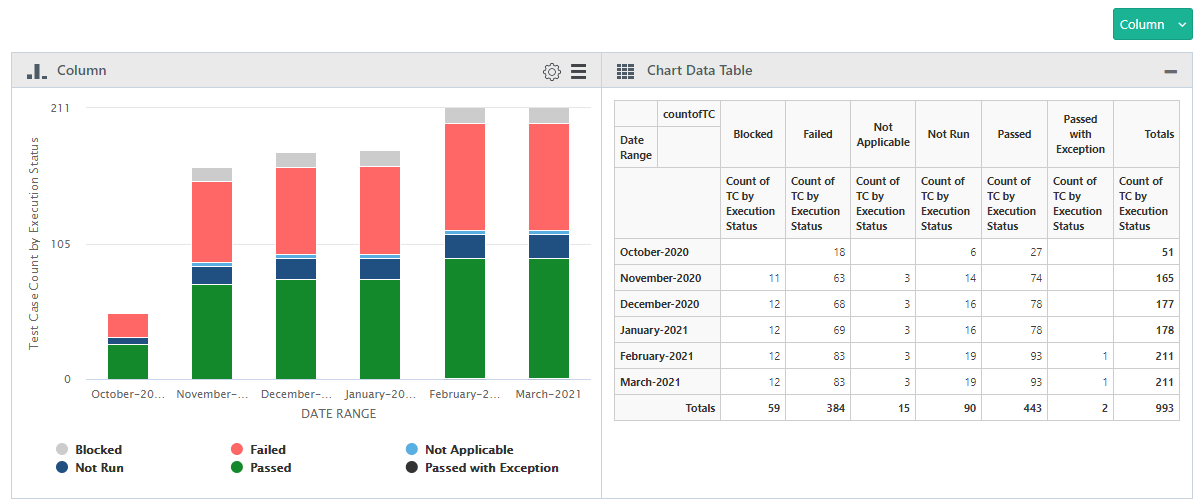 |