Copy or Move Shareable Test Cases
Copy or move shareable test cases between folders, either individually or in bulk.
Note
Move: Linkages for shareable test cases remain intact when moved within the same project.
Copy: Linkages are not retained when you copy shareable test cases.
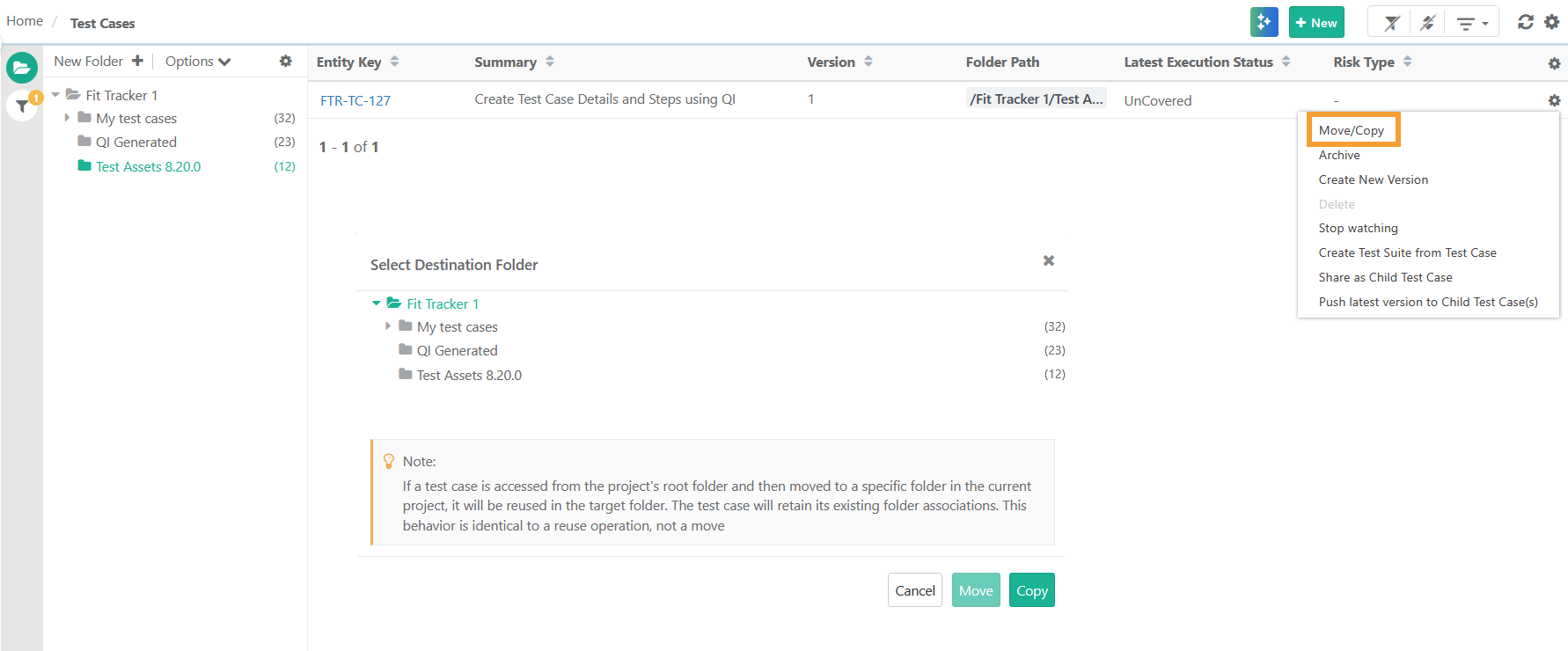
To copy or move shareable test cases, perform the following steps:
 |
Go to the Test Cases module.
Expand the Filters and select Show Only Shareable.
Click the Cog (⚙️) icon next to the test case.
Select Move or Copy.
Select the target folder.
Click Copy or Move.
Across Projects
Note
Move: The system generates a new Shareable Test Case key but linkages are maintained.
Copy: Linkages are not retained when copying shareable test cases.
You can copy or move test cases to a specific folder or to the root folder of the destination project.
The destination project must have the same user-defined fields as the source project.
To copy or move shareable test cases across projects, perform these steps:
Go to the project containing the original test case.
Go to the Test Case Module.
Click the Cog (⚙️) icon and select Bulk Operations.
Choose Operation: Select Copy or Move.
Select the test cases.
You can also select a a particulat test case version by expanding the test case.
Click Next.
Operation Details
Project: Select the destination Project and folder path to save the copied test case.
Owner: Select the Owner of the test cases in the destination project. The Owner list is populated as per the Project.
Folder: Select the folder to copy the test cases. You can also create a new folder by entering a name and clicking Add Folder.
Click Copy or Move to get the confirmation message.
When performing bulk copy, the system creates independent copies; changes to the original test cases won’t affect the copied versions.
What will be copied or moved with test assets?
Operation | Same Project | Across Project |
|---|---|---|
Copy or Move | For the selected versions, copy or move assets with all attachments, linkage of requirements, test cases, release, cycle, issues (linked with Requirement). | For the selected versions, copy or move assets with all attachments. |