Configuring Jira Integration for Data Center
Connect QMetry Test Management to Jira by using your QMetry credentials or a QMetry Open API key. Once connected, you can sync requirements, bugs, and test results between the two applications.
You can connect one Jira Data Center instance to more than one QMetry instance. Each Jira project connects to only one QMetry instance at a time.
Note
Support for multiple QMetry instances applies to Jira Data Center and Jira Server only.
Pre-requisites
Before you configure the integration, make sure you meet the following requirements:
You have Jira system administrator permissions.
You have QMetry Admin credentials, or an Open API key, for each QMetry instance that you want to connect.
You connect QMetry to Jira by using QMetry authentication. Single sign-on (SSO) login does not support the integration.
You use system administrator credentials.
For cloud instances, use the account of the user who registered the QMetry instance.
For server customers, the Admin user is the administrator.
If QMetry uses two-step verification, you have the verification code available to complete the connection.
To use the Open API key method, you have enabled the Integration package, which provides the Open API key.
Connect Using Credentials
Use this method to authenticate with your QMetry Admin credentials. To connect using credentials, do the following:
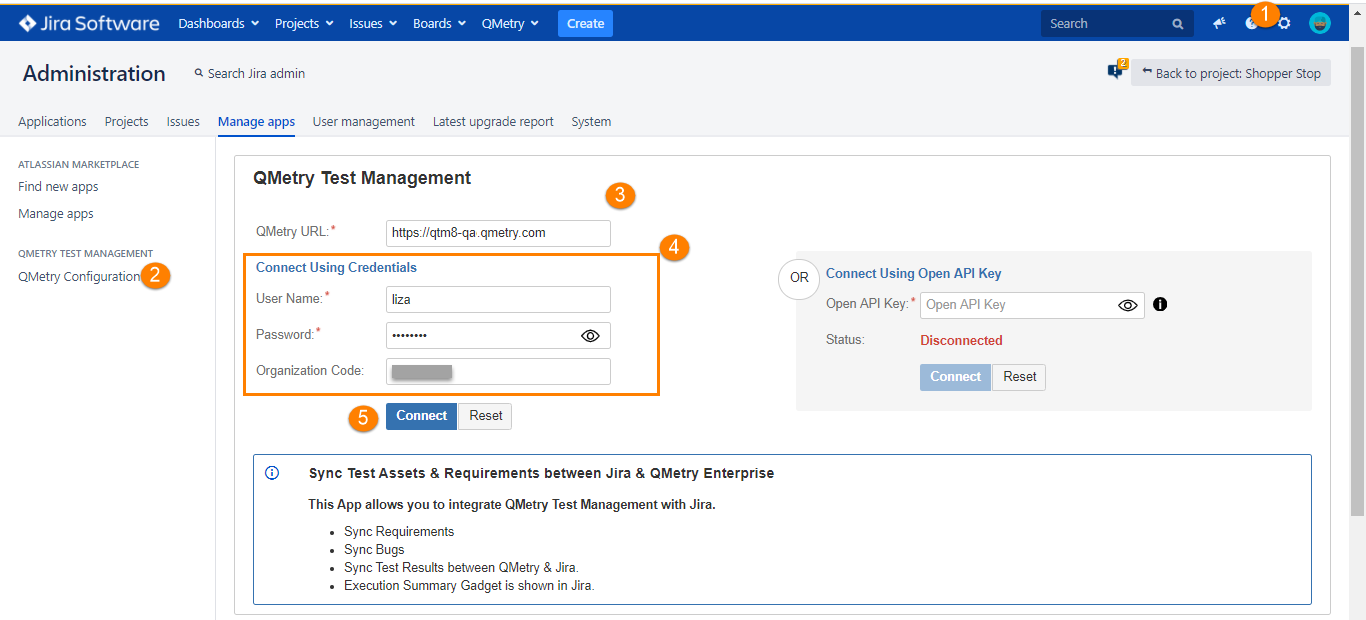
In JIRA, go to administration settings and select QMetry configuration.
In the QMetry URL box, enter the QMetry URL.
In the User Name and Password boxes, enter your QMetry admin credentials, and then enter your Organization Code.
Select Connect.
Note
If two-step verification is enabled for the user, provide the two-step verification code and click Submit.
Connect Using Open API Key
Use this method to integrate Jira with QMetry by using the Open API key. To connect using an Open API key, do the following:
Note
The Open API Key is available only to users who have opted for the Integration app.
Go to Connect using Open API Key section.
Get the Open API key from the Integrations section in QMetry.
Select Connect to establish the connection.
Verify All Modules are Enabled
Note
Skip this step if you're using Cloud Jira.
If you are on Server or Data Center version of Jira, verify that all the modules are enabled on the Manage app screen.
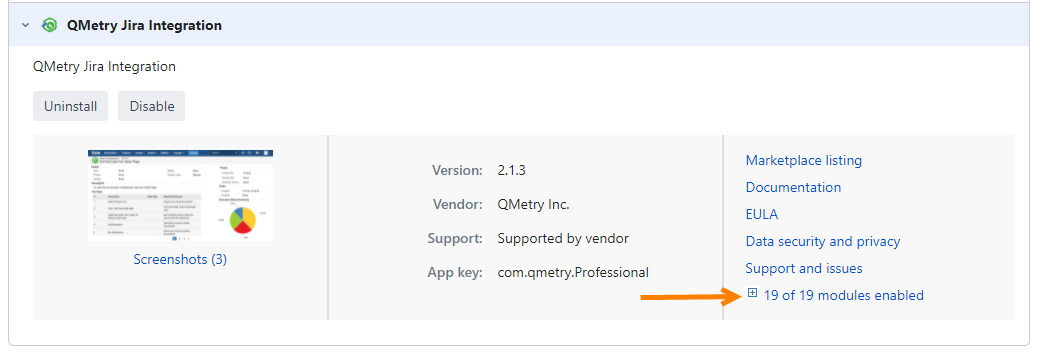 |
In Jira, go to Apps and select Manage apps.
Expand the modules and enable all of them.
Jira is now integrated with QMetry Test Management. You can sync requirements, bugs, and test results between QMetry and Jira, and the Execution Summary gadget appears in Jira.