Copying and Moving Test Cases
Reuse the test case across different folders and projects with Copy and Move operations.
Note
Select a destination folder while copying, else the system places the copied test cases in Root folder.
Copied test cases do not inherit folder associations.
You can copy or move test cases either individually or in bulk.
Go to the Test Case Module.
To copy or move individual test cases, click the cog (⚙️) icon for that test case and select Copy or Move.
For Bulk Copy or Move Operations, click the cog (⚙️) icon at the right and select Bulk Operations.
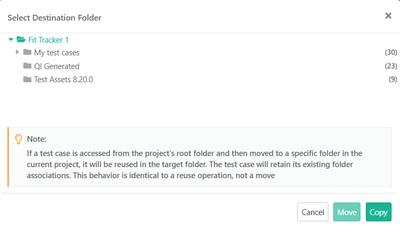
Select the test cases and the destination folder.
 |
Business Rules: Moving Test Cases
Move test cases within the current project, either individually or in bulk.
From a Specific Folder
Moving a test case removes it from the source folder and adds it to the destination folder.
From the Root Folder
Moving a test case from the Root folder, adds it to the destination folder without removing it from the Root folder.