Sync Fields to Reports
Note
The feature is only available to the customers who have opted for the Advanced Reports App.
Only users with Integration “Modify” rights can enable or disable the sync.
Sync the mapped custom fields of the external tracker to the reports. Include Jira's custom fields of Issues and Requirements modules in QMetry Insight tables for both Visual and Advance Query Reports to create a custom report with UDFs.
If Sync Fields to Reports is “On”: The mapped custom fields for Issues and Requirements modules are synced in the QMetryInsight module.
If Sync Fields to Reports is "Off": The synced fields in the QMetry Insight module are removed.
Use Case: Project admin wants to create a custom report in QMetry Insights using Jira's custom fields, which are mapped in Project Integration Screen.
Note
After enabling or disabling an external tracker integration, you can modify its state again only after 8 hours.
After enabling or disabling the option for one external tracker integration, update the options for other integrations only after 4 hours.
You cannot disable the Sync Fields to Reports option while the syncing process is in progress.
Only the external UDFs mapped under the Project and Integrations tab are synced to the QMetry Insight module.
A maximum of 1000 UDFs, including internal and external, can be synced to the Insight module.
Field syncing to reports occurs at the instance level. As a result, all users of projects integrated with the external tracker can view the synced UDFs in the Insight module.
If the integration with the external tracker is removed, the UDFs will no longer appear in the Insight module.
To , perform the following steps:
Go to Integrations and open the Integrations tab.
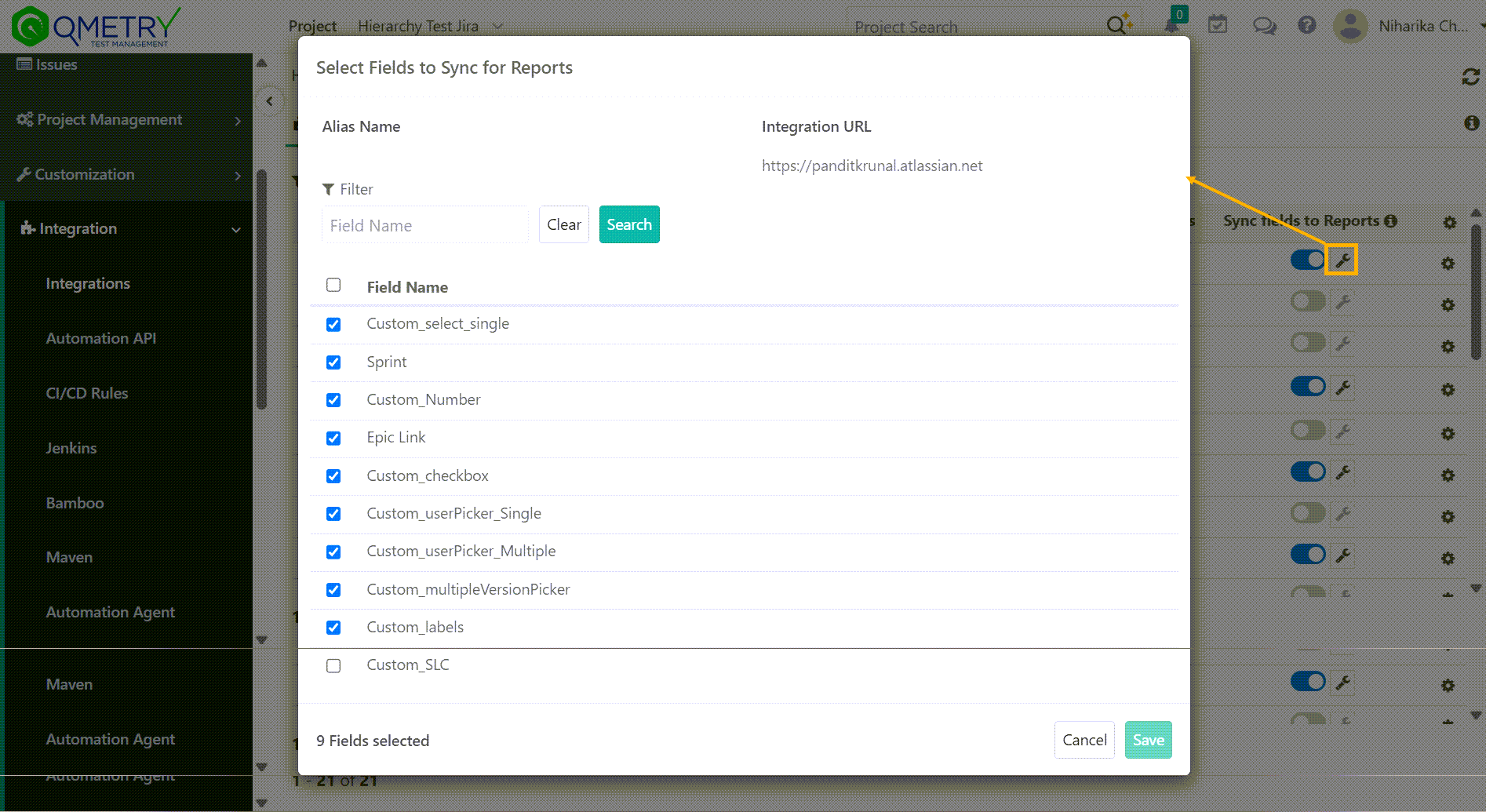
Turn the Sync fields to Reports option “On” for the integration to sync mapped external custom fields to QMetry Insights. By default, the option remains “Off”.

Select fields to Sync for Reports: Select Jira custom fields to sync with QMetry Insight Advanced Query Reports. Manage which external custom fields are available for reporting and prevents unnecessary data synchronization.