Archive Folders
Archiving a folder archives and hides all the subfolders and assets under it. Archiving also hides the folder for the release and cycle it is associated with, which helps testers keep completed releases and cycles out of the active view.
Archiving a Single Folder
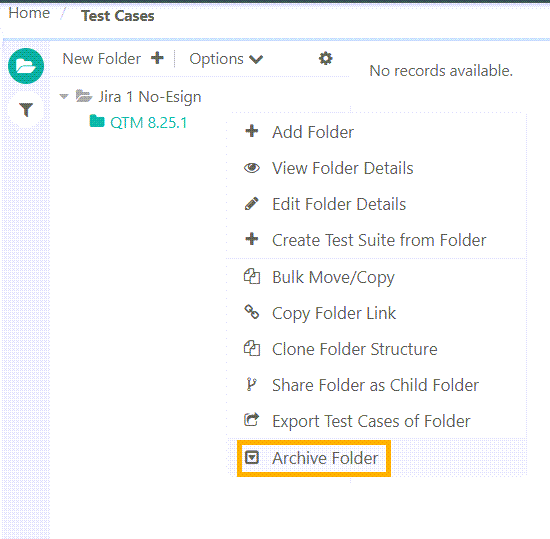
To archive a folder, perform the following steps:
 |
Go to the specific module.
Select the folder to archive.
Right click on the folder and select Archive Folder.
Unarchiving a Single Folder
To unarchive a single folder, perform the following steps:
Go to the Test Asset module.
Expand the filters and select Show Archived Items in basic filters.
Select the archived folder and click Unarchive.
Archiving and unarchiving multiple folders
To archive or unarchive folders in bulk, see Archive and Unarchive Bulk Folders.
Viewing Archived Folders in the tree
To view archived folders in the folder tree, expand the basic filters and select Show Archived Items.
Impact of Archiving or Unarchiving Entities on Folders
The following table describes how archiving or unarchiving entities affects the folder.
Operation on entities | Consequence on Folder |
|---|---|
Archive entities from folder | Folder is not archived automatically |
Unarchive entities from an archived folder | Folder is unarchived automatically |