Archiving and Deleting DataGrid
To archive datagrid, perform the following steps:
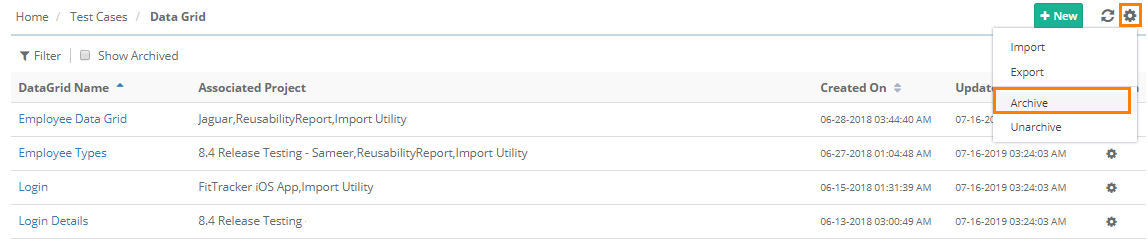 |
Go to Test Cases and select DataGrid.
Click the Cog (⚙️) icon and select Archive.
Note
You cannot archive Data Grids mapped to test cases.
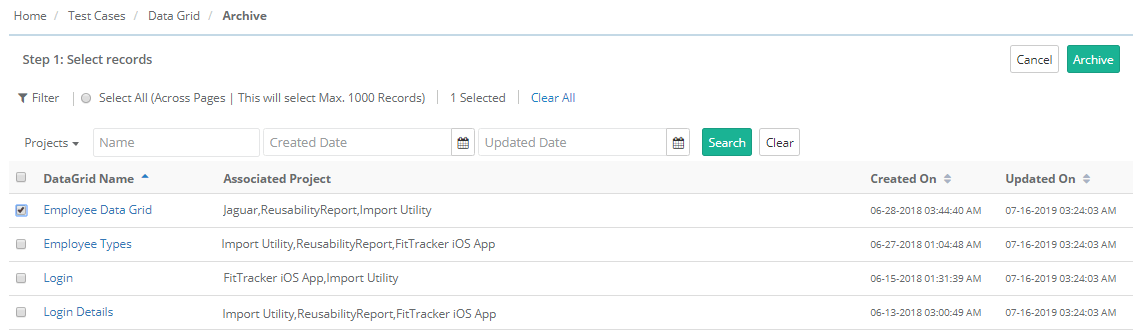
To archive multiple Data Grid records at a time, select records using check boxes and click on the Archive button.
Unarchiving a Data Grid
To unarchive the datagrid, perform these steps:
Go to Test Cases and select Data Grid
Click the Cog (⚙️) icon and select .
To unarchive multiple Data Grid records at a time, select records using check boxes and click .
Deleting a DataGrid
To delete a datagrid, perform these steps:
Click the Cog (⚙️) icon for the Data Grid and select .