Flaky Score Configuration
Admins must define the scope of test executions for Flaky Score calculation. AI calculates the Flaky Score based on the filtered test execution records, using the specified criteria. The existing Flaky Score resets and recalculated whenever you modify the configuration.
Provide the following details for the Flaky Score rate configuration:
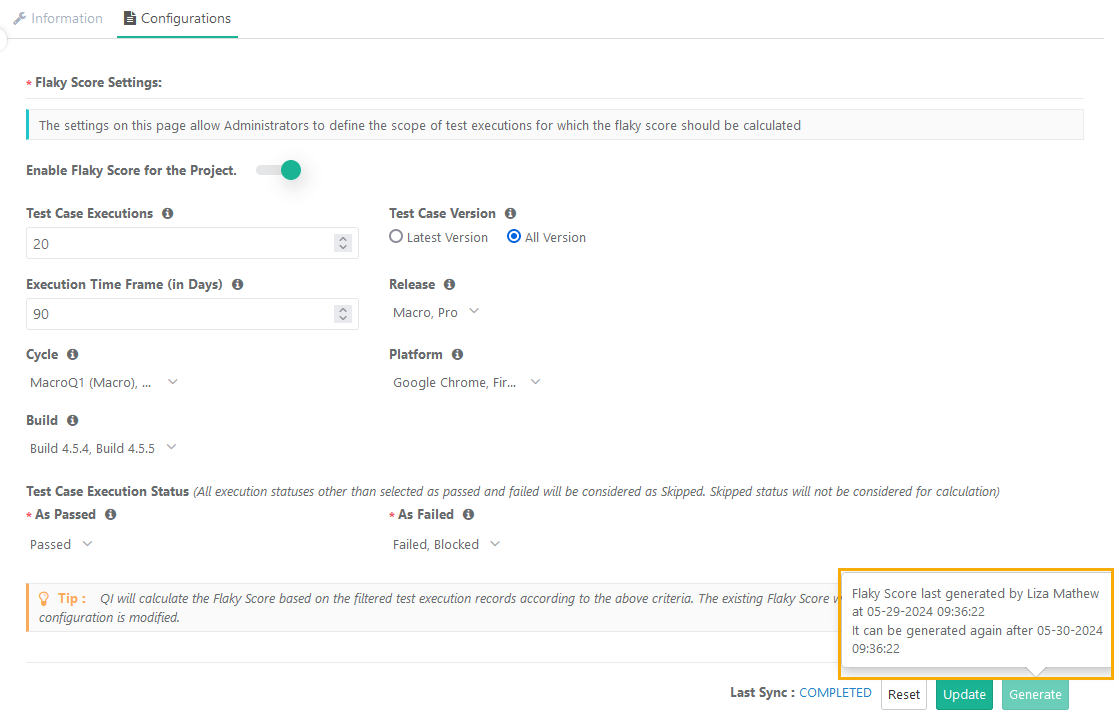 |
Test Case Executions: Mention the number of the latest test executions for a test case to consider while calculating the flaky score.
Note
By default, the system selects 10 test executions.
The Test Case Execution value should be from 1 to 1000.
Test Case Versions: Select the executions for either the “Latest Version” or “All Version” test case versions to consider while calculating the flaky score. The “Latest Version” test case version is selected by default.
Latest Version: The system considers only the latest executions of the latest versions of the test cases.
All Versions: The system considers the latest test executions of all test case versions.
Execution Timeframe (days): Mention the days to define the timeframe in which the test executions were executed in the last specified days.
Note
By default, the system considers test executions from last 90 days.
If left blank, the system considers all days.
Release: Select Releases to consider test executions for those releases. By default, the system selects “All” releases.
Cycle: Select Cycles to consider test executions for those cycles. By default, the system selects “All” cycles.
Platform: Select Platforms to consider test executions for those platforms. By default, the system selects “All” platforms.
Build: Select builds to consider the test executions pertaining to that particular builds. By default, the system selects “All” builds.
Test Case Execution Status (The system considers all execution statuses other than as passed and failed as Skipped. The system do not consider skipped statuses for calculation).
As Passed: The system considers test executions with these statuses as "Passed". The default value is “Passed”.
As Failed: The system considers test executions with these statuses as "Failed". The default values are “Failed” and “Blocked”.
Note
By default, the system selects “All” platforms.
Action Buttons
Click Update to save the Flaky Score Settings.
To reset the settings, click Reset.
To generate the flaky score, click Generate.
You can view the Flaky Score on the test case list view, test case details screen, test case link screens, and test execution screens.