Create Test Suites from Requirements
You can create a test suite from a requirement or a requirement folder. QMetry copies the common fields from the requirement and links the associated test cases to the test suite.
This feature is useful in the following situations:
You have requirements with relevant test cases already linked to them.
You want to start test suite execution as soon as the requirement is ready.
You want to track execution of requirements using test suites that share the same name and field values.
Pre-requisites
Confirm the following before creating a test suite from a requirement:
You must have Create rights for the Test Suite module. Admins can grant these rights from Roles.
Ensure the requirement is not archived.
Ensure the requirements have at least one linked test case.
For folder creation, ensure the folder contains at least one requirement.
Understanding the Test Case Sequence
When you create a test suite from a requirement, QMetry links the test cases in the same order as defined in the requirement. The same order applies when you link test cases to an existing test suite using a requirement or a requirement entity key.
The following requirements and test cases are excluded when creating or linking a test suite with the requirement. The remaining test cases follow the order defined in the requirement:
Archived test case versions.
For eSignature-enabled projects:
QMetry does not show the Create Test Suite from Requirement option for the following:
Requirements in In Review state.
Requirements with no test cases in Approved state.
Unapproved test cases.
Note
Whether QMetry links or skips a test case that is already linked to the test suite depends on your Test Case Dependency setting for the project:
Dependency disabled: QMetry links the test case again and retains the requirement order.
Dependency enabled: QMetry excludes the already-linked test case. The remaining test cases follow the order defined in the requirement:
When you link multiple requirements to a test suite, the test cases follow the order in which you selected the requirements. Test cases from the first requirement appear first, followed by test cases from each subsequent requirement.
Create Test Suite from Requirement Folder
Creating a test suite from a requirement folder adds all eligible test cases from the requirements within that folder to the new test suite. The test suite is created with the same name as the folder.
To create a test suite, perform the following steps:
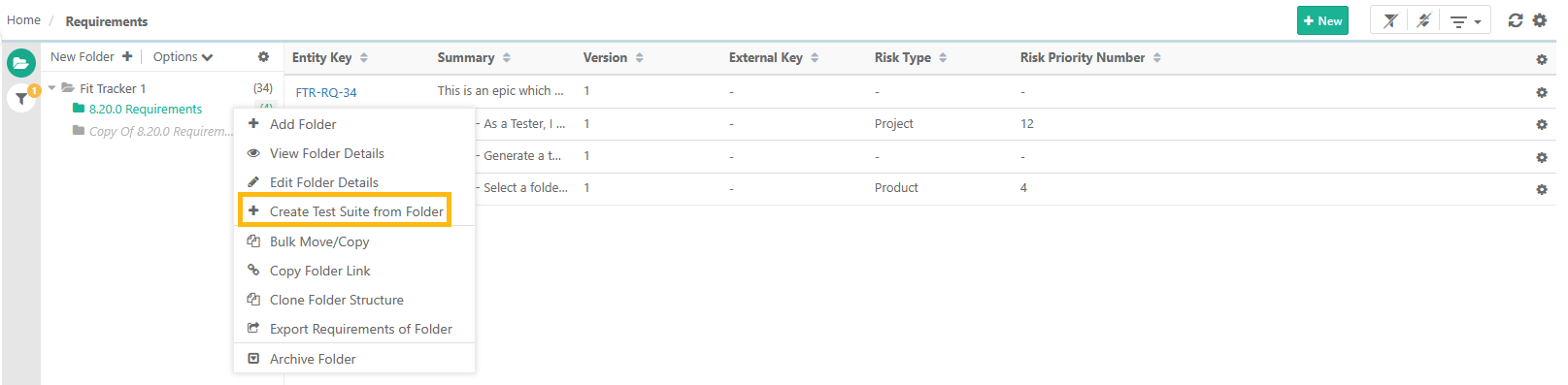 |
In the Requirement module, right-click the relevant requirement folder.
Select Create Test Suite from Folder.
Creating a test suite from a requirement folder associates eligible test cases with the requirements within that folder.
Creating a Test Suite from a Requirement
You can create a test suite from a requirement using the list view or the requirement details page.
 |
Important
The system populates the test suite name and other fields from the requirement.
The system selects associated releases and cycles when creating the test suite.
Create another Test Suite from the same requirement by adding more test cases.
Link platforms to the test suite after creating it, if they are not already linked.
Assign testers and track test execution history.
Once created, the test suite is independent. Later changes to the requirement do not affect it.
From the Requirement List View
To create a test suite from the requirement list view, perform the following steps:
In the Requirement module, click the Cog icon next to the relevant requirement.
Select Create Test Suite from Requirement.
From the Requirement Details Page
To create a test suite from the requirement details page, perform the following steps:
Open the relevant requirement.
In the top-right corner, click the Cog icon.
Select Create Test Suite from Requirement.
QMetry populates the test suite name and other fields from the requirement and selects the associated releases and cycles automatically.
Note
Once created, the test suite is independent. Later changes to the requirement do not affect the test suite.
Creating a Test Suite from Requirements Imported from Jira
To create a test suite from a folder containing requirements imported from Jira, perform the following steps:
In the Requirement module, right-click the folder that contains the imported requirements.
Select Create Test Suite from Folder.
QMetry creates the test suite with all eligible test cases linked to the requirements in the folder.