Integration of QMetry with JIRA
QMetry offers integration with Jira to enable real-time synchronization of Work Items across modules. The integration allows Jira users to view testing progress directly within Jira.
Requirements Module: Jira Work Items such as Epics and Stories are synced in real-time to QMetry. Testers can view these stories directly in the Requirements module and link relevant test cases.
Issues Module: Jira Work Items like Bugs, Defects, and Tasks are synced bi-directionally with QMetry. You can create and update defects in either system and link them to test executions in QMetry for end-to-end defect traceability.
In-Jira Visibility: All Jira users having access to the Work Items can view linked test cases, test steps, and execution results directly within Jira.
Advantages of Jira Integration
View Jira stories and bugs in QMetry.
Link Test Cases from QMetry to Jira work items.
Log, sync and trace issues in both systems.
Execute test cases in QMetry and track them in Jira.
Link Jira issues with requirement and test case (from Test Suite Execution screen), and create Jira issues from the Execution screen.
Map Requirement with Jira Issue Types and sync those issues as requirements in QMetry.
Note
You can link multiple Jira instances with one QMetry instance.
You can link multiple Jira projects with one QMetry projects.
QMetry and Jira Integration Workflow
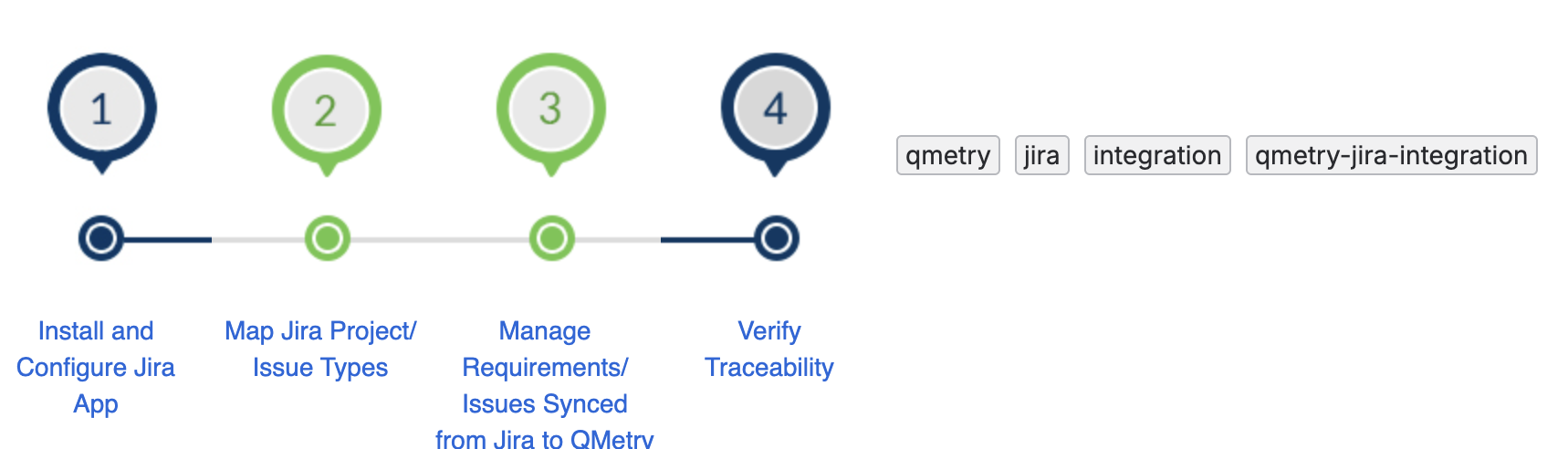 |
Step 1: Install QMetry App in Jira
For installing QMetry in Jira, refer to the Integration of QMetry with Jira document.
Step 2: Connect QMetry to Jira
Connect each QMetry instance to Jira by using QMetry credentials or a QMetry Open API key, and give each instance an alias that identifies it on screen. For more information, see the following topics:
Configuring Jira Integration for Cloud
Configuring Jira Integration for Data Center
Section 3: Verify the Integration is Active
Confirm that the connection is active before you configure projects. For more information, see Verify QMetry-Jira Integration.
Step 4: Integrate Jira Project with QMetry Projects and Map Jira Work Items with QMetry Modules
Link each Jira project to a QMetry project, and map Jira work item types to the Requirements module, the Issues module, or both. For more information, see Mapping QMetry and Jira Projects, Fields, and Entities document.
Jira issues having their issue types mapped with the Issues module of QMetry, get imported and synced with the Issues module. These issues are visible with the external key indicating the Jira Issue Key.
QMetry internal issues added from the Issues module before Jira integration are hidden.
Step 5: Enable QMetry Test case and BDD panels for Jira Projects
Enable the panels that display QMetry test case and BDD data inside Jira work items. For more information, see Enable QMetry Test Case and BDD Panels.