QMetry Test Management Apps
QMetry comes in Enterprise and Enterprise+ editions, offering a range of premium Test Management features, known as ‘Apps’.
Designed to enhance test authoring, planning, execution, and reporting, Test Management solutions cater to diverse testing needs. These apps help teams optimize workflows and improve efficiency.
QMetry Application Packages
Features | Package | Description |
|---|---|---|
Enterprise | Efficiently create, reuse, organize, and execute test cases across multiple cycles with seamless test suite management. | |
Enterprise | Leverage a centralized repository to store, create, and manage test requirements and business specifications efficiently. | |
Enterprise | Create, view, and modify issues seamlessly, add attachments, and specify details for enhanced bug tracking. | |
Enterprise | Gain valuable insights with built-in system reports. Track team progress, assess testing efficiency, and optimize outcomes. | |
Enterprise | Integrate with Jira and Azure to sync requirements, defects, and test cases for streamlined test management. | |
Enterprise | Seamlessly import and export test assets in bulk for better reusability, scalability, and collaboration. | |
Enterprise | Import automation results from popular automation frameworks like JUnit, TestNG, Cucumber, Robot, or use a Custom Automation Template. | |
Enterprise | Track changes, maintain historical records, and revert to previous versions, ensuring control at every stage of the testing process. | |
Enterprise | Automate your test executions effortlessly with Jenkins, Bamboo, and Maven integration for continuous testing and faster releases. | |
Enterprise | Save time and boost efficiency with seamless test step sharing. Enhance reusability while eliminating repetitive tasks. | |
Enterprise | Leverage BDD to author, store, and sync feature files with VCS (SVN, Git, GitLab, Bitbucket, Azure DevOps) via Gherkin editor. | |
Enterprise | Run the same test case multiple times with different data inputs without duplicating test cases. | |
Enterprise | Share test assets across projects, enabling easy access to requirements, test cases, and issues across teams. | |
Enterprise | Manage multiple users by associating them with relevant projects and roles, grouping them, and ensuring smooth collaboration. |
Customization
Customization App enables you to customize user permissions, notifications, custom fields, list values and execution statuses as per your organization’s testing processes.
Features | Package | Description |
|---|---|---|
Enterprise | The product comes with a default layout. With customization feature, you can tailor the page layouts of Requirements, Test Cases, Test Suites and Issues module. | |
Enterprise | QMetry offers default System Fields. Add/remove custom fields, map them to specific projects, and mark system fields as mandatory. | |
Enterprise | The product comes with a system-specific list. Add custom Lists and corresponding values to categorize test assets like Priority. | |
Enterprise | The product offers basic View & Modify rights. Define tailored permissions such as Create, Delete, Execute, Import, Export, Link, Copy, and Versioning for each asset. | |
Enterprise | QMetry provides default execution statuses. Create custom execution statuses like ‘In Progress’ or ‘Omit’ alongside pre-defined options to enhance test tracking and flexibility. | |
Enterprise | Set default build on the execution screen, make build selection mandatory for projects, and assign builds to individual test cases. | |
Enterprise | Manage platform attributes to define key features and configurations. | |
Enterprise | Configure SMTP settings for outgoing mail transport from QMetry. | |
Enterprise | Enhance security by mandating two-step verification for all users. | |
Enterprise | Configure settings like - maximum login attempts, account reactivation time, password expiry period, email notifications for password expiry, and test execution timestamps. | |
Enterprise | Configure automatic email notifications for specific events. You can also enable customized notifications for eSignature-enabled projects |
Integration
Integration app enables access to 150+ Open APIs, Exports of test assets, report and dashboards, scheduling reports, triggering automations using Automation Agent and integration with LDAP/SAML for authentication.
Features | Package | Description |
|---|---|---|
Enterprise | By default, you get QMetry authentication. Enable authentication via Active Directory (LDAP) and SAML. | |
Enterprise | QMetry features only Manual Test Execution. Enable Automated Test Executions to leverage QMetry Agents for triggering the execution of automation scripts. | |
Enterprise | QMetry supports only the import of test assets. Export/reimport test assets via Excel/CSV. Export Test Assets to PDF. The test cases linked to test suites can also be exported. | |
Enterprise | QMetry provides “view” only access to reports. Export the entire report to PDF or Word in just a click. | |
Enterprise | A Default dashboard comes with “view” access. Export dashboard details to CSV or Excel and share them with teams. | |
Enterprise | Automate recurring report deliveries with our Email Scheduler. | |
Enterprise | Utilize 150+ Open API to integrate QMetry with third-party tools. | |
Enterprise | Initiate Worksoft CTM suite to execute tests, track progress, import results, and link them to test cases automatically. |
Exploratory Testing
Record sessions using inbuilt exploratory testing capabilities that allow testers to capture screenshots of any content without leaving your browser window.
Features | Package | Description |
|---|---|---|
Enterprise | Document test steps, record events, and capture network/console logs with exploratory testing. | |
Enterprise | Automate test case authoring by creating test cases, linking requirements, and executing tests. | |
Enterprise | Raise bugs from the exploratory testing extension directly to Jira or QMetry. | |
Enterprise | Export exploratory testing session details, documented test steps, and associated defects to Word. | |
Multi-Browser Support | Enterprise | Exploratory testing is available as an add-on for Chrome, Firefox, and Edge. |
Audit & Compliance
Configure retention policy and view audit reports.
Features | Package | Description |
|---|---|---|
Enterprise | View reports displaying all events that occurred in QMetry across projects. | |
Enterprise | View reports displaying the history of requirements, test cases, test suites, and issues. |
Advanced Reports
Advanced Reports App offers QMetry Insight, QMetry Custom Gadgets, and QMetry Custom Dashboards, ensuring clear visibility of your testing projects.
Features | Package | Description |
|---|---|---|
Enterprise + | The product offers pre-defined system reports.Create your custom reports through Visual Reports and Advanced Query Reports. | |
Enterprise + | Write custom SQL queries to generate tailored reports, gaining greater flexibility in test management reporting. | |
Enterprise + | QMetry comes with default dashboards.Create your custom Dashboard and share it across teams for collaboration. | |
Enterprise + | Sync and display external tracker fields in QMetry Insights - Visual Report entities and Advanced Query Report tables. | |
Enterprise + | Designed for business users, Visual Reports simplify custom report creation and visualization without technical expertise. |
eSignature
Regularize the review workflow of requirements and approval workflow of test cases and test executions, and closure workflow of test runs. View audit reports to meet Security and Audit Compliance standards.
Features | Package | Description |
|---|---|---|
Enterprise + | Leverage multilevel requirements review workflows to ensure all linked test cases are authored and all use cases are covered. | |
Enterprise + | Enable Part 11 Compliance, requiring users to authenticate before modifying the execution status, ensuring an added layer of security. |
Advanced Features
You can opt for more advanced features like support for Risk Based Testing, Test Case Dependencies and SCIM 2.0.
Features | Package | Description |
|---|---|---|
Enterprise + | Risk-Based Testing prioritizes testing those areas that are most exposed to risks and have a higher chance of defects. | |
Enterprise + | Test Case Dependency allows QA teams to manage dependencies in test case execution, ensuring an efficient testing process. | |
Enterprise + | SCIM 2.0 automates user identity management across systems, simplifying the creation, updating, and removal of user accounts. |
QMetry Intelligence (AI Features)
Unleash the power of AI with QMetry Intelligence - automate test case creation, generate smart SQL queries for tailored reports, and more.
Features | Package | Description |
|---|---|---|
Enterprise + | Utilize "Search - Ask Me Anything," an AI-powered search feature that enriches the user experience by enabling search queries in plain English. | |
Enterprise + | Auto-create test cases from Requirement, Test Case, or User Provided Description with AI-powered Auto-Generate Test Cases and Steps. | |
Enterprise + | Generate, modify, and understand custom SQL queries in simple English with QI Query Assistant. | |
Enterprise + | Employ AI to assess test case reliability by analyzing execution history, helping testers identify unpredictable test cases with the QI Flaky Score. | |
Enterprise + | Gain insights into test case success rates by analyzing execution history for better decision-making. |
QQBot
Features | Package | Description |
|---|---|---|
Enterprise + | Identify redundant test cases while creating, editing, and viewing test cases/requirements using QQBot’s duplicate detection algorithm. | |
Enterprise + | Quickly find and link relevant test assets to requirements or test cases using QQBot’s intelligent algorithm. |
Internationalization
Features | Package | Description |
|---|---|---|
Enterprise + | QMetry supports multiple languages, including English and Spanish by default, with additional languages available upon request. |
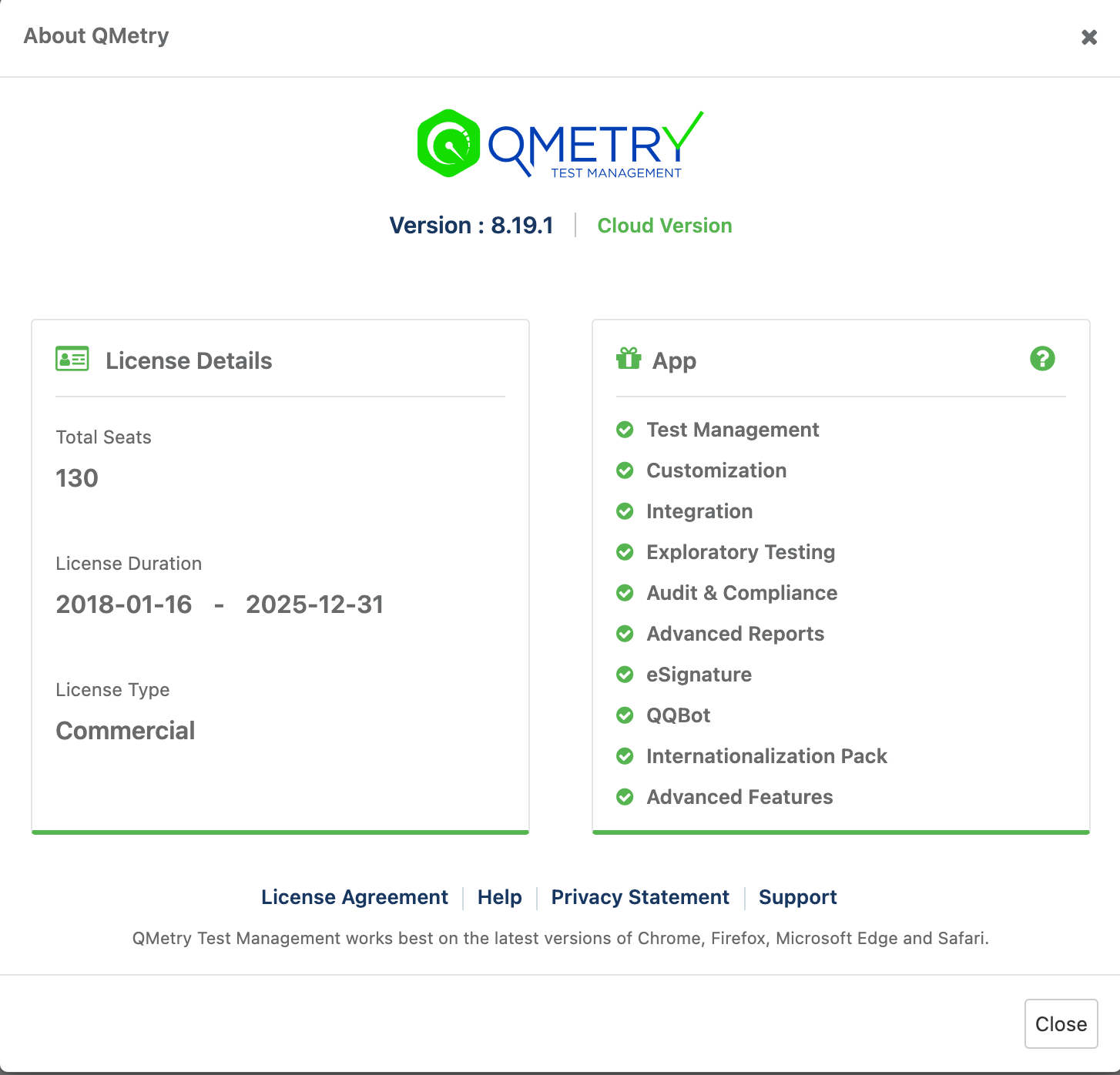
About QMetry
Navigate to About QMetry to see the allotted Apps.
 |