Manage Grid Columns
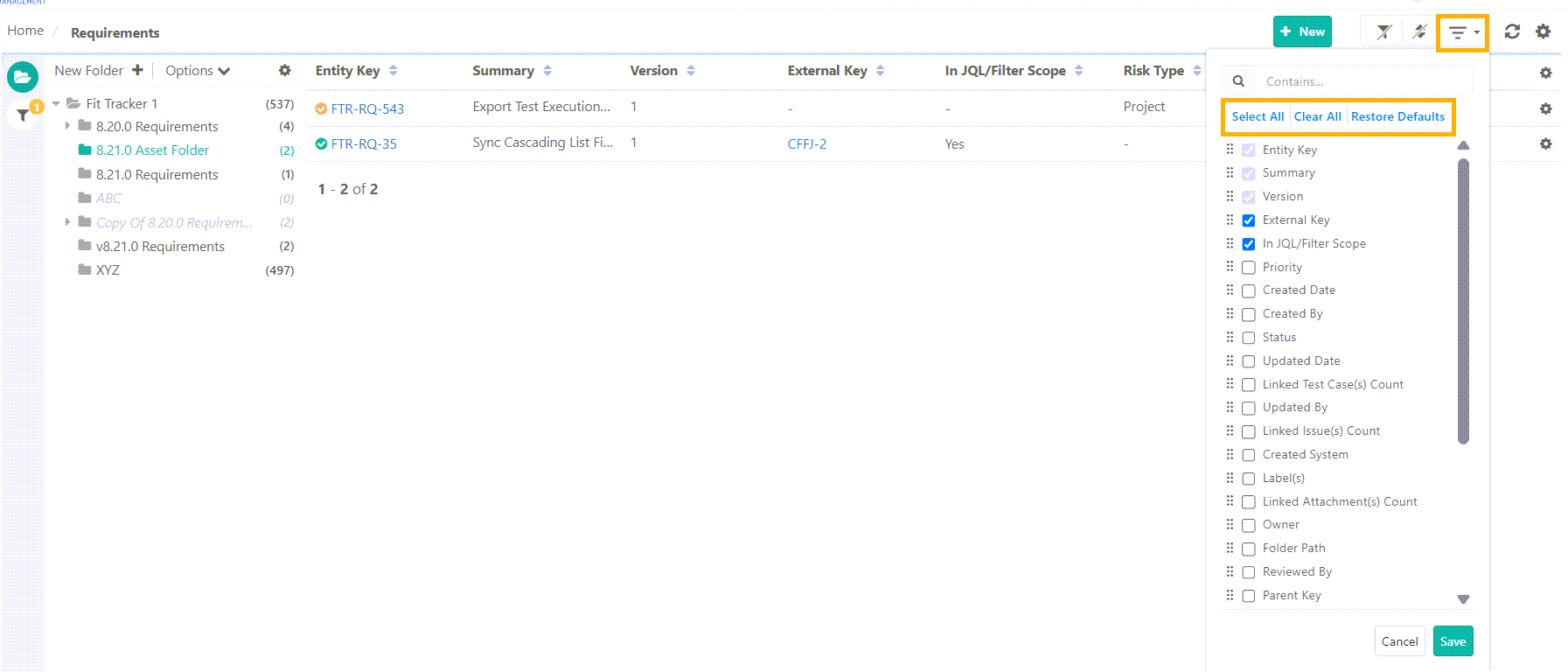
Customize the grid view in Requirements, Test Cases, Test Suites, and Issues modules using the option. The customized view is saved for future use.
The following customizations can be applied to the grid view:
 |
Show Columns
Customize grid view by adding necessary columns. To display additional columns, select the relevant fields from the Arrange Columns section.
Hide Columns
Remove columns from the grid view. If certain columns are not needed, deselect them to hide them from the module grid.
Re-arrange columns
Rearrange columns in a specific order using the drag-and-drop feature in the Arrange Columns panel
Resize Grid Columns
Resize the columns by dragging the edges of column headers. The Resized column widths are saved at the project level.
Use Case: The column resizing functionality allows you to view complete details without extra clicks or hovering over field values.
Organize Tabs
Customize the view of the detail page by changing the order of tabs. The tab order is preserved per user.
Additional Grid Operations
Action | Description |
|---|---|
Search | Locate specific fields using the search box. |
Select All | Add all available columns to the grid. |
Clear All | Remove all columns except the default ones. |
Restore Defaults | Revert all customizations and return to the default view. |