Removing Jira Integration from a QMetry Project
Remove the Jira integration from a QMetry project to stop synchronizing requirements and issues between QMetry and Jira.
Jira integration in QMetry allows seamless synchronization of requirements and issues. If the integration is no longer needed, you can remove it to discontinue data synchronization between QMetry and Jira. The following steps outline the process and its impact.
Note
Removing the integration deletes the Jira work items that are synced to the QMetry Issues module, along with all of their associations.
When to Remove the Integration
Remove the integration in the following situations:
The QMetry project no longer needs to synchronize data with Jira.
The Jira system administrator needs to disable the Jira project for QMetry integration in Jira. A Jira project cannot be disabled while it is linked to a QMetry project.
The Jira project needs to move to a different QMetry instance. For more information, see Managing Connected QMetry Instances.
A Jira project was deleted or archived in Jira and the link is no longer needed.
The Jira system administrator needs the app to return to Single Instance Mode. The app returns to Single Instance Mode only when one QMetry instance is left holding active Jira project links. For more information, see About Multiple QMetry Instances.
Removing Jira Integration from a QMetry Project
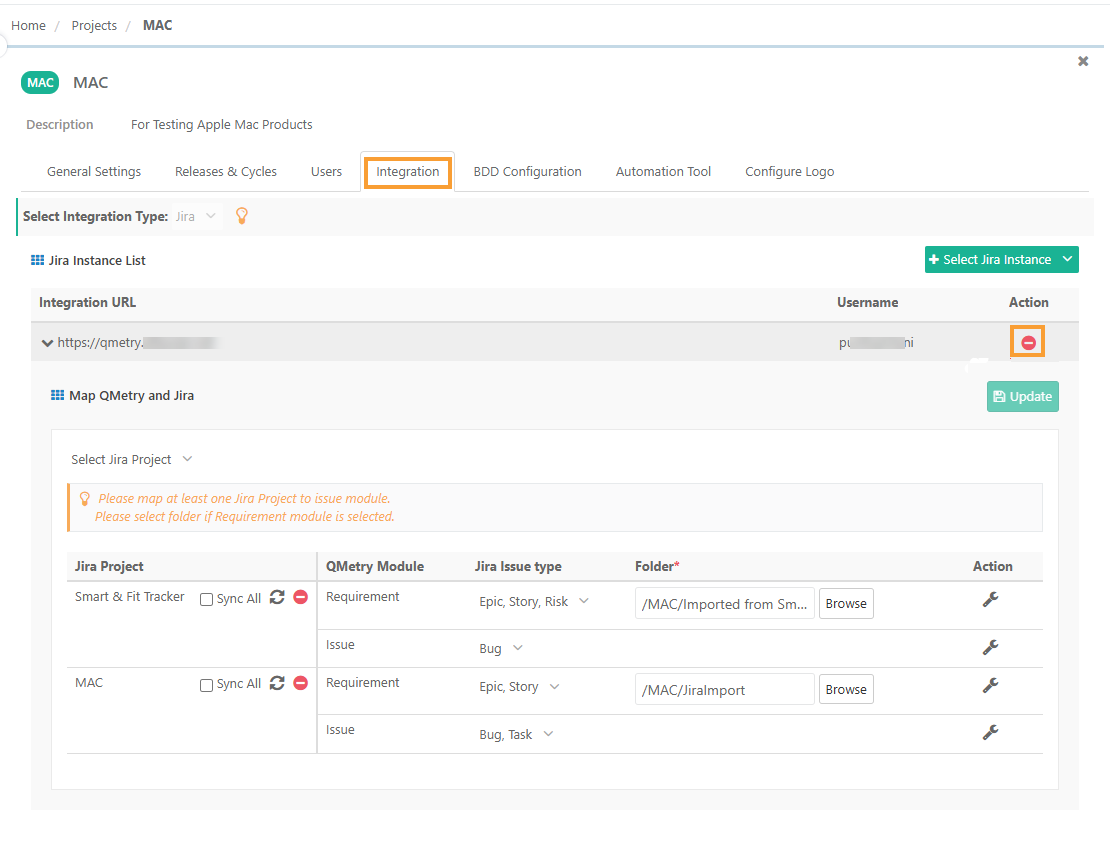 |
To remove Jira integration from a project, perform the following steps:
Go to Project Management and select Projects .
Click Your QMetry Project and go to Integration.
In Select Integration Type, select Jira.
In the Jira Integration List, expand the integration URL.
Click the icon next to the integration URL that you want to remove.
This action removes all linkages of Jira projects associated with that Jira instance.
Impact on Synced Requirements and Issues
When Jira integration with a QMetry project is removed, it impacts the synchronization of requirements and issues as follows:
Change | Requirements | Issues |
|---|---|---|
Existing synced work items | Existing Jira stories synced as requirements, QMetry converts them into internal requirements. | Existing Jira issues synced as bug QMetry removes them and any linkages with them are lost. |
Links to Jira | These requirements are no longer linked to Jira. | These issues are no longer be linked to Jira. |
Future synchronization | No new Jira issues sync as requirements into QMetry. | No new Jira issues sync as issues in the Available Issues tab on the Link Issues screen. |
Impact in Jira
After you remove the integration:
The Jira project is released from this QMetry instance. The Jira system administrator can disable it, or assign it to a different QMetry instance, in Jira.
Links That This Action Does Not Affect
The following actions do not remove the link between a Jira project and a QMetry project:
Action | Effect on the link |
|---|---|
The Jira system administrator removes the connection to this QMetry instance in Jira | The link is kept, so that no test data is lost. The Jira project continues to show this QMetry instance in the project list in Jira. If the administrator reconnects the instance, the Jira project shows as connected again. |
A Jira project is deleted or archived in Jira | The link is kept, along with the QMetry data. If it is not restored, remove the integration in QMetry. |
A QMetry project is deleted in QMetry | The association with the linked Jira project is removed automatically, because the QMetry project no longer exists. |
References
Mapping and Unmapping a Single Jira Project
Selecting Jira Projects for QMetry Integration
Managing Connected QMetry Instances