Viewing Test Execution Summary for Bugs in Azure
The QMetry Test Coverage section in Azure provides a quick overview of test execution and bugs linked to the test cases. This helps users monitor test outcomes and associated issues directly within Azure Work Items.
QMetry Test Coverage tab is visible only if the Azure project admin has enabled the project-level settings for the QMetry Test Management extension.
To enable QMetry Test Coverage Panel, refer Enabling Project-Level Setting in Azure DevOps document.
Prerequisites
Install the QMetry Test Management extension in Azure DevOps.
Configure the Azure integration and verify the connection in the QMetry Integration Settings.
Map QMetry and Azure Projects, Fields and Entities.
Enable Project-Level Setting in Azure DevOps.
Viewing Test Execution Summary for Bugs in Azure
To view test execution summary for bugs in Azure, perform the following steps:
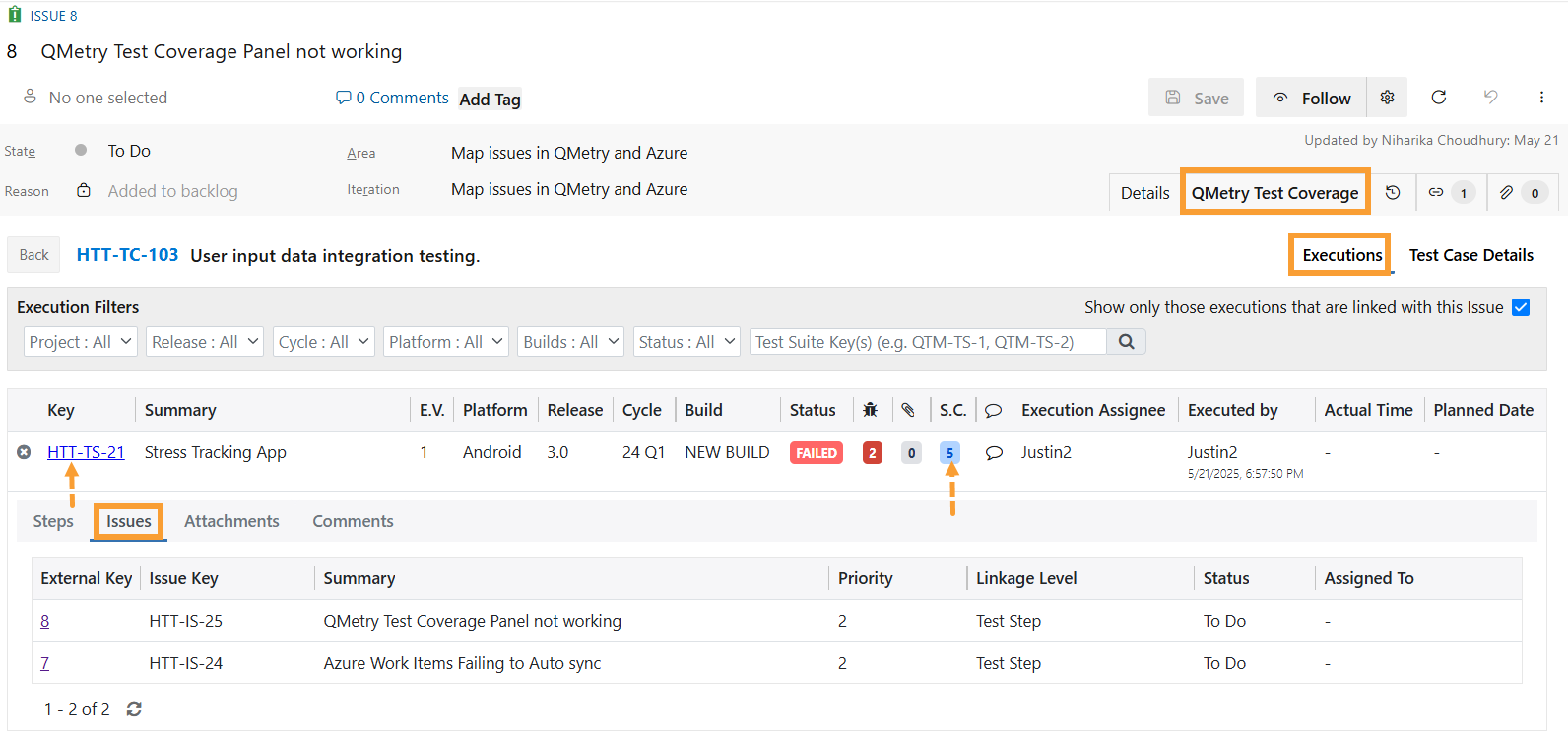
Open the relevant Azure Work Item (Bug or Task).
Navigate to the QMetry Test Coverage tab.
Click the Total Executions Count to open the execution screen.
Enable the Show only those executions that are linked with this issue checkbox to filter and view only the linked executions.
Expand the test suite by clicking the + icon or the number under the Step Count column.
Go to the Issues tab to view all issues linked with this execution.