Test using HP UFT
Mapping with QMetry
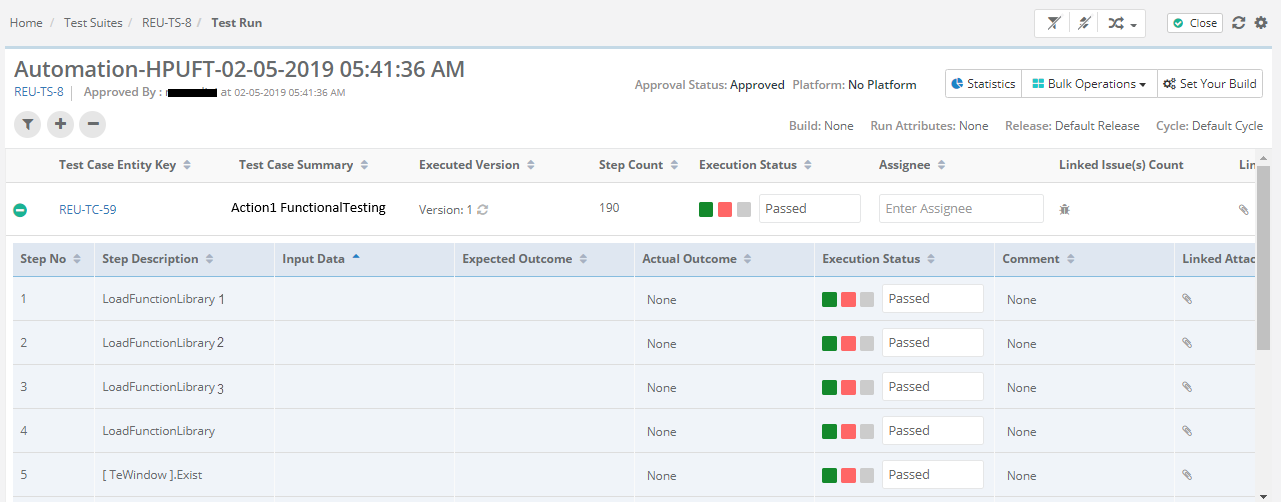
Here is how you can specify the Test Cases and Test Steps which will be created in QMetry as a part of the result files -
Test Case Tag | Test Step Tag |
|---|---|
<ReportNode> with ‘type’ attribute as ‘Action’ | <ReportNode> tags under the test case nodes with ‘type’ attribute as ‘Step’ (All the tags under the hierarchy of <ReportNode> for test case are considered) |
Supported file types : XML
Sample Test Result File
Click here to download a sample file.
//confluence-embedded-image" loading="lazy" src="attachments/925172055/925040915.png" data-image-src="attachments/925172055/925040915.png" data-unresolved-comment-count="0" data-linked-resource-id="925040915" data-linked-resource-version="1" data-linked-resource-type="attachment" data-linked-resource-default-alias="UFT2.png" data-base-url="https://qmetrysupport.atlassian.net/wiki" data-linked-resource-content-type="image/png" data-linked-resource-container-id="925172055" data-linked-resource-container-version="7" data-media-id="c238451e-6639-4ca5-b061-58779a036a3d" data-media-type="file">
→ “Skip” status in the automation result file will be applied as "Not Applicable" instead of "Not Run" for automation test executions upload into QMetry.
//confluence-embedded-image" height="250" loading="lazy" src="attachments/925172055/925139199.png?height=250" data-image-src="attachments/925172055/925139199.png" data-unresolved-comment-count="0" data-linked-resource-id="925139199" data-linked-resource-version="1" data-linked-resource-type="attachment" data-linked-resource-default-alias="UFT1.png" data-base-url="https://qmetrysupport.atlassian.net/wiki" data-linked-resource-content-type="image/png" data-linked-resource-container-id="925172055" data-linked-resource-container-version="7" data-media-id="5c2d2607-612e-412d-b4c2-782b311d7bf0" data-media-type="file">
