Test using Cucumber
Cucumber is one of the tools for running automated tests. It combines business specification and test documentation into one, which results in an executable specification. Due to this collaboration, it encourages teams to keep their organization’s business goals in center.
Automated testing through Cucumber helps teams avoid heavy regressions and resultant cost.
Here is how you can specify the Test Cases and Test Steps which will be created in QMetry as a part of the result files -
Test Case Tag | Test Step Tag |
|---|---|
elements > name > Name Property | elements > steps > name |
Supported Cucumber Version: 1.2.5
Supported file types: JSON
Sample Test Result File: Click here to download a sample file.
Sample Test Result File

Note
“Skip” status in the automation result file will be applied as "Not Applicable" instead of "Not Run" for automation test executions upload into QMetry.Reuse existing Test cases and Requirements
While importing test result file, if you want to reuse Test Case and Requirements here are the annotations that need to be provided in the feature file.
Keyword | Description |
|---|---|
@testEntityKey |
|
@requirementKey |
"tags": [
 {
 "name": "@testEntityKey\u003dAP-TC-319"
 }
 ,{
 "name": "@requirementKey\u003dAP-RQ-815"
 },{
 "name": "@requirementKey\u003dAP-RQ-817"
 }
|
The Description value in the result file for the Cucumber framework will be imported into QMetry as Test Case Description when a new version of a test case is created. If the test case description is available in file and also passed in the testcase_fields parameter, then priority will be given to the Description value in the file.
Note
In scenarios where a manual test case is reused, the test case result will be updated. The test case version will increase by 1 due to changes in test steps. This particular test case version will be automated test case. The earlier version of the test case will remain manual.
Feature: Banking
As a user
I want to make an ATM Transaction

@requirementKey=AP-RQ-1
@requirementKey=AP-RQ-3
@testEntityKey=AP-TC-28
@testEntityKey=AP-TC-32
@testEntityKey=AP-TC-37
Scenario: Withdraw less money
        Scenario to withdraw less money and verify
Given I have $1200 on my account
When I withdraw $600
Then I get $600 from the ATM

@requirementKey=AP-RQ-1
@testEntityKey=AP-TC-27
Scenario: Withdraw more money
        Scenario to withdraw more money and verify
Given I have $150 on my account
When I withdraw $300
Then I get $0 from the ATM

@requirementKey=AP-RQ-1
@testEntityKey=AP-TC-26
Scenario Outline: Withdraw money from the account
        Scenario to withdraw money
Given I have $<balance> on my account
When I withdraw $<withdraw>
Then I get $<received> from the ATM
Import Execution Attachments
Testers want to import a Cucumber result file into QMetry by scheduling automation for the test suite using the Maven framework. During this test case creation and import of results, they also want to attach screenshots/attachments for the failed results during the automation. The attachments will be shown at the test case level on the execution screen.
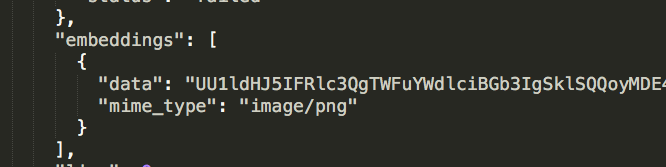
To add attachments in test run execution, you need to capture the log file and screenshots during the execution of automation testing. The attachment file should be base64 encoded with mime_type in the embedding tag of the report file.
Configure Cucumber Project
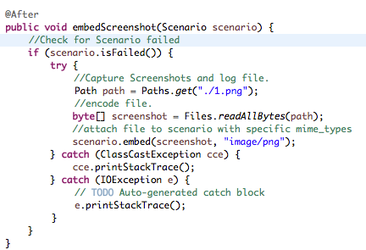
Result File Output with Attachment
List of file types (mime types) supported in the Cucumber framework.
Types of Attachment | Supported File Types |
|---|---|
Image | image/png, image/bmp, image/gif, image/jpeg, image/x-icon |
Text Document | text/plain, text/richtext, text/scriptlet, text/html, application/xhtml+xml, text/css, application/x-javascript, application/x-sh, application/pdf, application/rtf, application/xml |
Excel, Word, PPT | application/msword, application/vnd.ms-excel, application/vnd.ms-powerpoint |
Audio File | audio/mpeg |
Compressed File | application/zip, application/x-rar-compressed, application/x-7z-compressed, application/x-tar |
Sample Project: https://github.com/qmetry/cucumber-maven-example