User Navigation
Navigate through the application using the expandable and collapsible menu. By default, the main menu is expanded.
Navigating through Main Menu
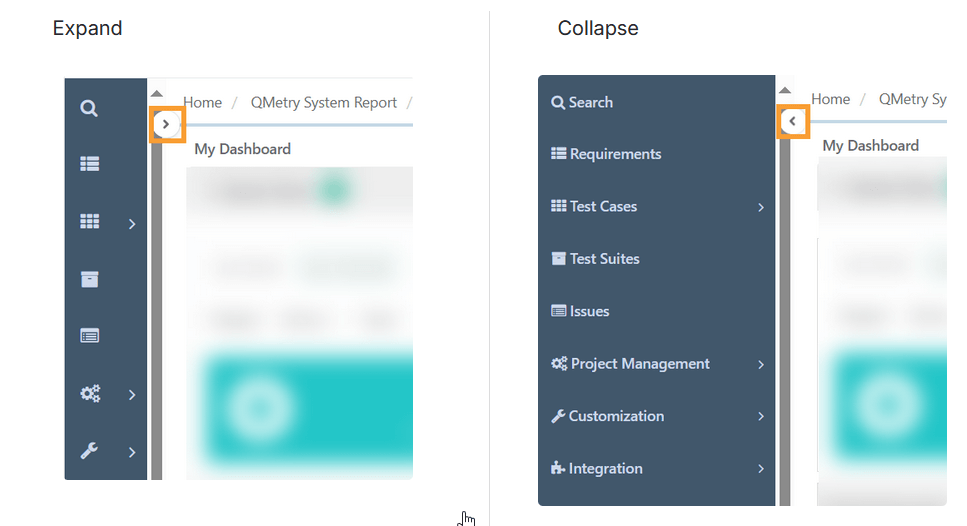 |
The main menu provides access to modules, settings, customizations, reports, and other tools. Use the search button at the top to search specific features.
Navigating Assets
Navigate through the assets within a module in any of the following ways:
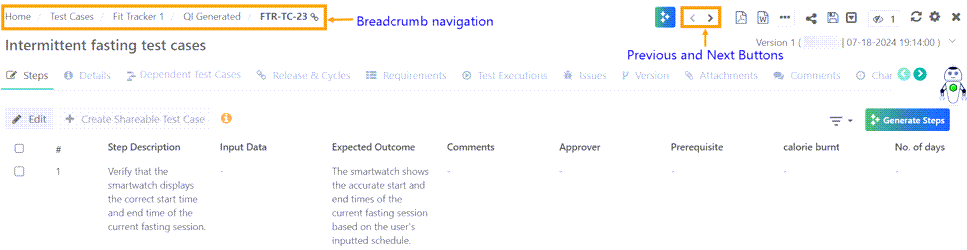
Breadcrumb Navigation: Click the breadcrumbs to move along the asset path.
Previous and Next buttons: Switch between consecutive assets present in a folder.
The breadcrumb trail shows clickable links for each folder. Hover over a folder name to see the link, and click to open that folder in the asset repository.
If you have stored a test case in multiple folders, then the folder path breadcrumb reflects the path from which you have accessed the test case.