Bulk Copy or Move at Directory Level
Share multiple folders within the same project or across different projects through bulk copy or move option at the director level. It is available in the Requirements and Test Cases modules.
Why would you want to copy or move test assets in bulk?
Bulk move or copy of folders reduces maintenance efforts, enhances collaboration across teams and projects by sharing test artifacts across projects.
Suppose, you have Project A in the organization. Now you add another project say, Project B. The projects need similar test assets for Login and Import activities. The QA team can copy the Login and Import folder of Project A to Project B.
The organization is following multiple testing cycles. Their requirements keep updating over a period. The testing team would be referring to the same set of requirements to create new test cases in the next cycle. Hence, they prefer copying the requirement folder and make changes to it as per updated specifications.
Move or Copy Folders in Bulk
Note
Get module access rights in the destination project.
Requirements imported from Jira or other external tracker can only be moved or copied within the same project.
To move or copy folders in bulk, perform the following steps:
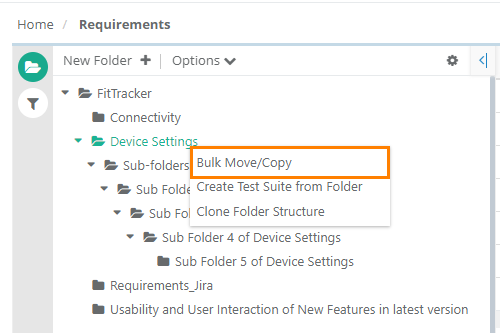
Right click on the folder to apply bulk move or copy.
Select Bulk Move/Copy.
Select the folders to move or copy.
Click Include Root Folder Entities to copy or move entities positioned under the root folder.
Click Next.
In the destination project structure, select the Owner.
Click Copy or Move.
Move: Removse the selected folder from the source project and adds it to the destination project.
Copy: Copies the selected folder from the source project and adds it to the destination project.
To view the progress of folder move or copy operation, check the Scheduled Task. Read more about Scheduled Tasks.
If the folders contain entities with user-defined fields (UDFs) that are not available in the destination project, those UDFs are auto-created in the destination project after user confirmation.
The UDFs are copied or moved with all the values within them.
What gets copied or moved?
All versions of requirements or test cases
Shared test assets
What cannot be copied or moved?
Comments
Watchers
Audit Log (when folders moved or copied across projects)
Archived Versions.