Doughnut Chart
Doughnut charts are generated based on count for an entity.
Example 44. Doughnut Chart
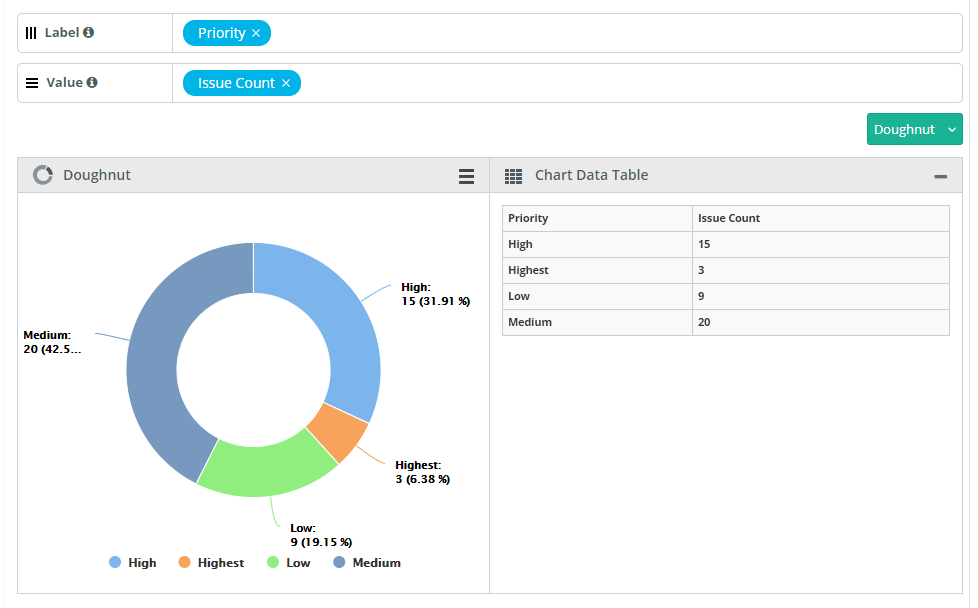
Generate a chart that displays the Count of Issues logged, by their priority for a specific project
SQL Query
Count of Defects By Status For a Project
SELECT
issues.priority as "Priority",
count(1) as "Issue Count"
FROM issues
WHERE issues.projectID in (`@Filter.project`)
GROUP BY issues.priority
Query Output
By default the output is in Tabular format, modify the format to view it in Pie chart.
Adjust the Columns based on the requirement to X-Axis, Y-Axis and Cross Tab.
Label always holds a single Test entity field with any value.
Value always holds a single Test entity field with any value (i.e. with numeric values)
 |
Click Add Gadget to save the report as a Gadget.
Once you save the gadget, it becomes available in QMetry Custom Gadget under My Gadget tab.