Remove Jira Integration
Jira integration in QMetry allows seamless synchronization of requirements and issues. If the integration is no longer needed, you can remove it to discontinue data synchronization between QMetry and Jira. The following steps outline the process and its impact.
Removing Jira Integration from a Project
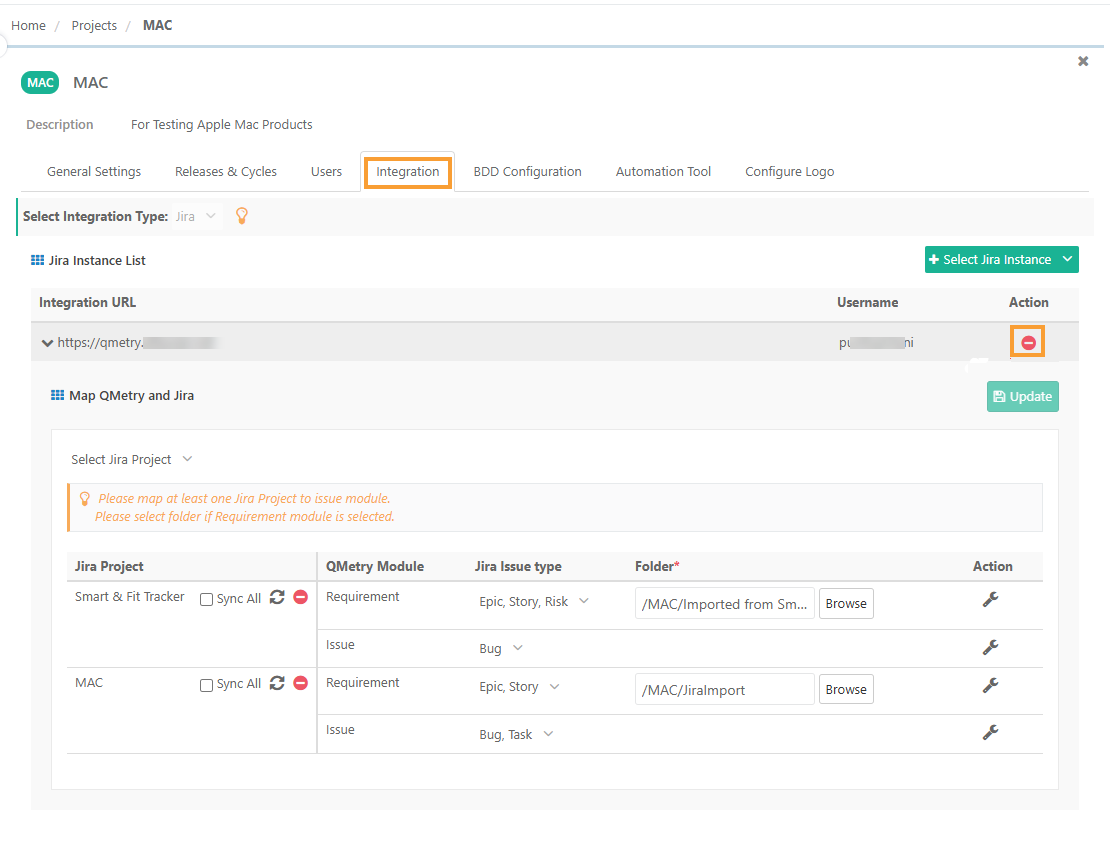 |
To remove Jira integration from a project, perform the following steps:
Go to Project Management and select Projects .
Click Your QMetry Project and go to Integration.
Expand the integration URL.
Click the icon next to the integration URL that you want to remove.
This action removes all linkages of Jira projects associated with that Jira instance.
Impact on Synced Requirements and Issues
When Jira integration with a QMetry project is removed, it impacts the synchronization of requirements and issues as follows:
Requirements | Issues |
|---|---|
Existing Jira stories synced as requirements in QMetry will be converted into internal requirements. | Existing Jira issues synced as bug in QMetry will be removed and any linkages with them will be lost. |
These requirements will no longer be linked to Jira. | These issues will no longer be linked to Jira. |
No new Jira issues will sync as requirements into QMetry. | No new Jira issues will sync as issues in the Available Issues tab on the Link Issues screen. |