Cross Table Chart
Cross table reports are two dimensional charts that are grouped on entities at row and column level. Mostly the summary charts are generated using cross tables.
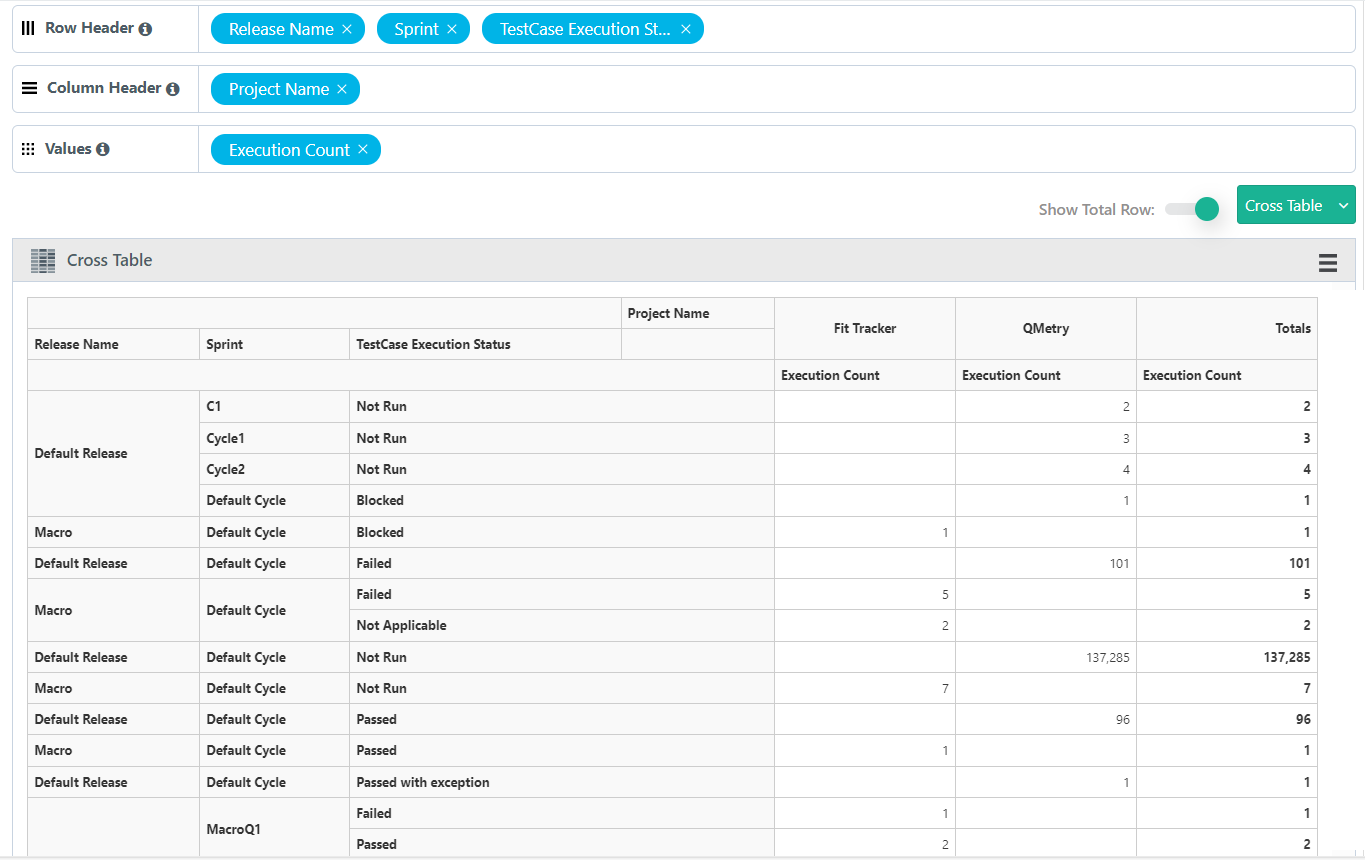
Generate a report that displays the count of test cases executed for a sprint i.e cycle grouped by their execution status for a project.
SQL Query
Summary of Test Case Execution Status By Sprint
SELECT
testexecutions.projectName as "Project Name",
testexecutions.releaseName as "Release Name",
testexecutions.cycleName as "Sprint",
testexecutions.tcExecutionStatusName "TestCase Execution Status",
COUNT(1) as "Execution Count"
FROM testexecutions
WHERE testexecutions.projectID in (`@Filter.project`)
GROUP BY testexecutions.releaseName, testexecutions.cycleName, testexecutions.tcExecutionStatusName
Query Output
By default the output is in Tabular format, modify the format to view it in Pie chart.
Adjust the Columns based on the requirement to X-Axis, Y-Axis and Cross Tab.
Row Header : Multiple Test Entity fields creates a grouped view in the Row section.
Column Header : Multiple Test Entity fields creates a grouped view in the Column section.
Values : Multiple or Single Value fields.
Click Add Gadget to save the report as a Gadget.
Once you save the gadget, it becomes available in QMetry Custom Gadget under My Gadget tab.