Test using TestNG
TestNG is a testing framework designed to simplify a broad range of testing needs, from unit testing (testing a class in isolation of the others) to integration testing (testing entire systems made of several classes, several packages and even several external frameworks, such as application servers).
Here is how you can specify the Test Cases and Test Steps created in QMetry as a part of the result files. Automation Hierarchy to be passed as automationHierarchy parameter in Automation API.
Automation Hierarchy | Test Case | Test Step Tag |
|---|---|---|
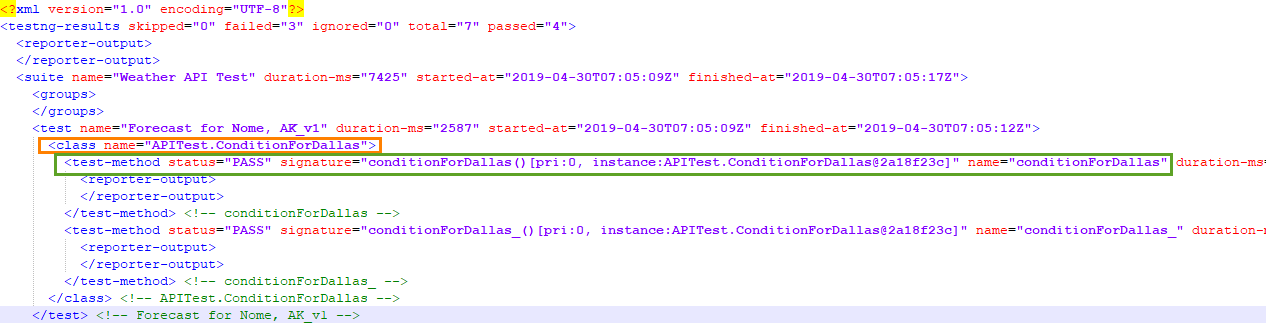
1 (default) | <class> tag under the <test> tag will be considered as Test Case. 'name' attribute of <class> tag will used as testcase summary. | <test-method> tag under <class> tag (with attribute "is-config" not set as true) will be considered as Test Case Step. 'name' attribute of <test-method> tag will be used as Step Description. |
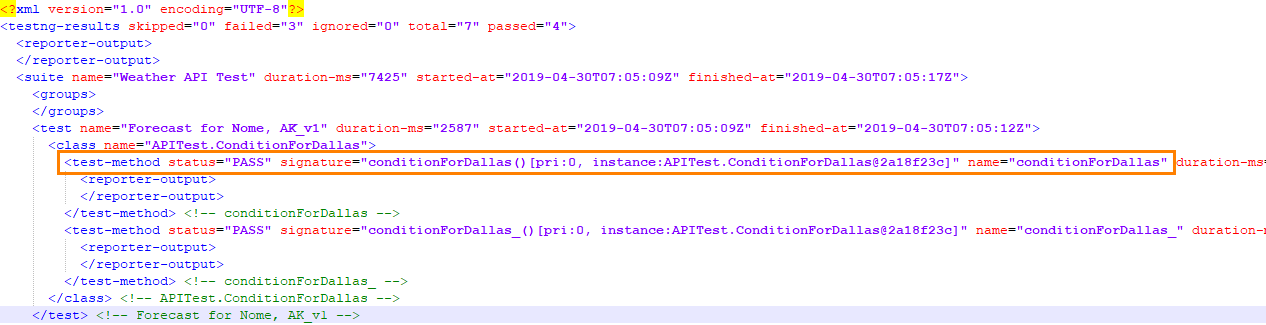
2 | <test-method> tag under <class> tag (with attribute "is-config" not set as true) will be considered as Test Case. 'name' attribute of <test-method> tag will used as testcase summary. | Test Case Step will not be created. |
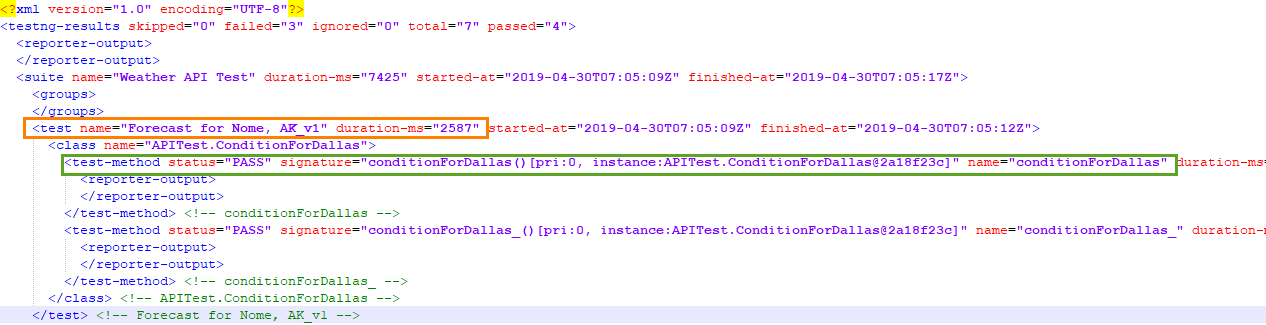
3 | <test> tag under the <suite> tag will be considered as Testcase. 'name' attribute of <test> tag will be used as testcase summary. | <test-method> tag under <class> tag (with attribute "is-config" not set as true) will be considered as Testcase step. 'name' attribute of <test-method> tag will be used as testcase step description. |
Supported Version: 1.2.5
Supported file types : XML
Automation Hierarchy 1
Automation Hierarchy 2
Automation Hierarchy 3
Note
“Skip” status in the automation result file will be applied as "Not Applicable" instead of "Not Run" for automation test executions upload into QMetry.
Reuse Manual Test Cases
No. | Methods | Applicable to Automation Hierarchy | Description |
|---|---|---|---|
1. | Summary | 1,2,3 |
|
2. | Keyword @Test(groups = {"testEntityKey"}) | 1,2, 3
|
|
Reuse Automation Test Cases
Here we anticipate that the file is imported in QMetry at least once. Now when the file is imported again -
If Test Case Summary and Step Description match: The same test case and its version will be reused and updated in QMetry.
If the Test Case Summary matches, but Step Description in QMetry does not match: A new version of test case will be created.
Link Requirements to Execution
Keyword | Applicable to Automation Hierarchy | Description |
|---|---|---|
@Test(groups = {"requirementEntityKey"}) | 1, 2, 3 |
<group name="requirementEntityKey:FIT-RQ-1 FIT-RQ-2">
|